
QFIL Tool v2.0.3.5 Free Download for Windows Latest Version [2026]
If a device has a failed software update, corrupted firmware, or certain boot-related issues. QFIL Tool provides a practical solution for flashing XML-based stock firmware and recovering supported Qualcomm-powered smartphones, tablets, and modems. QFIL helps to fix failed updates, software-related boot problems, and firmware corruption.
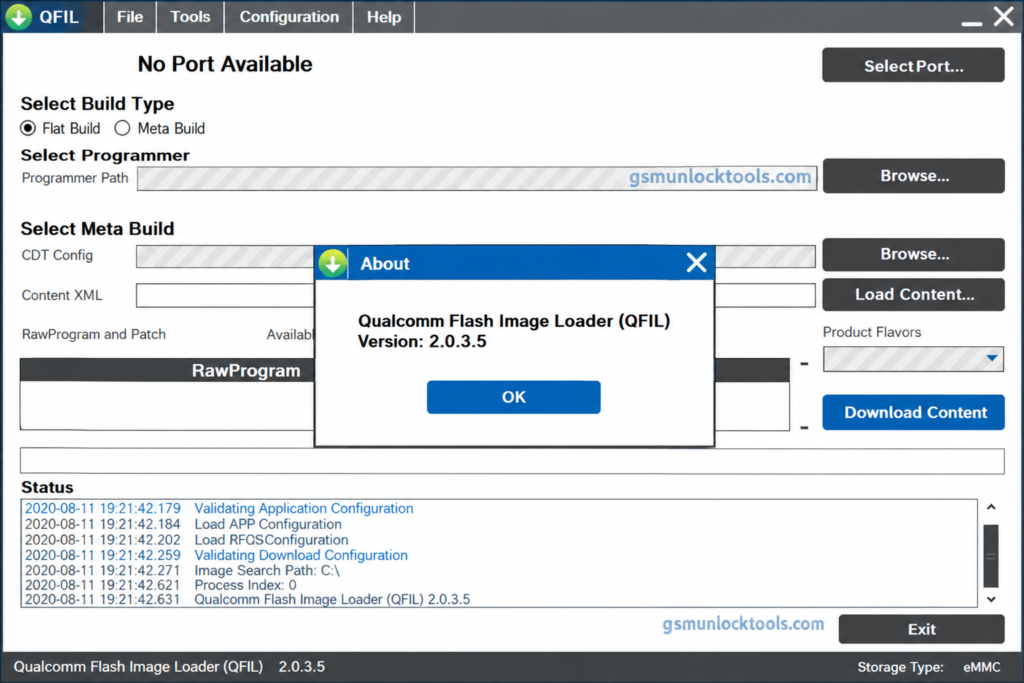
What is the QFIL Tool?
QFIL Tool is a Windows-based firmware flashing utility tool. It helps users flash compatible stock firmware onto Qualcomm-powered smartphones, tablets, and modems, particularly devices that support EDL mode. QFIL provides a practical solution for firmware restoration and troubleshooting, although compatibility depends on the device model, chipset, and firmware package.
Key Features of the QFIL Tool
Stock Firmware Flashing
QFIL allows users to flash stock firmware on Qualcomm-powered smartphones and tablets. It helps restore system software when an update fails.
EDL Mode Support
The tool communicates with supported Qualcomm devices in EDL mode. This feature helps users perform firmware recovery on compatible devices.
Bricked Device Recovery
QFIL can help recover devices affected by certain software failures, boot loops, or interrupted firmware updates. The recovery depends on device compatibility and the hardware.
QPST Integration
QFIL is included in the Qualcomm Product Support Tools software suite. This integration provides access to supported Qualcomm device servicing and diagnostics.
QCN Backup and Restore
The tool backs up and restores QCN files to preserve or restore certain device configuration data. This process requires suitable tools, valid backups, and device-specific compatibility.
What’s new in the QFIL Tool?
- Improved Qualcomm Firmware Flashing
- Enhanced EDL Mode Compatibility
- XML-Based Firmware Flashing Support
- Qualcomm USB Driver Compatibility
- Firmware Recovery for Supported Devices
- QPST Software Suite Integration
- QCN Backup and Restore Support
- Improved Device Detection and Connectivity
- Support for Compatible Qualcomm Chipsets
- Firmware Troubleshooting Capabilities
System Requirements
| Requirement | Minimum Specification |
| OS | Compatible with Windows 7, 8, 10, or 11 |
| RAM | 2 GB or more recommended |
| Storage Space | At least 100 MB of free space |
| USB Drivers | Compatible Qualcomm USB drivers |
| USB Connection | Working USB port and compatible data cable |
| Password | 123 |
How to Download & Install the QFIL Tool?
- Download the QFIL Tool from a trusted source.
- Click on the download link.
- Wait until the download is complete.
- Extract all files to your Desktop.
- Open the extracted folder.
- Enable USB debugging when using ADB functions.
- Open the downloaded tool.
- Run the tool as admin.
- The tool will open on your PC screen.
- Enjoy using the tool.
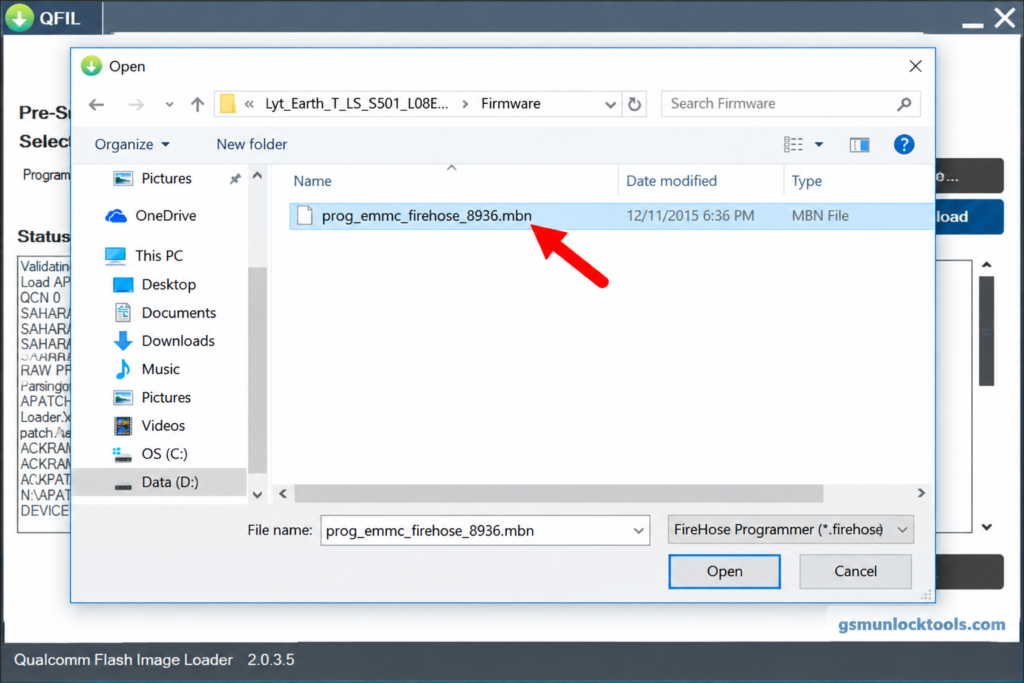
Pros & Cons
| Pros | Cons |
| Free Qualcomm firmware flashing utility | Supports only compatible devices |
| Helps recover certain bricked devices | Requires correct firmware files |
| Supports EDL mode flashing | Incorrect flashing may cause data loss |
| Supports XML-based firmware packages | Requires compatible Qualcomm USB drivers |
| Included in the QPST software suite | Not a universal FRP removal tool |
Also check: TFT Unlock Tool v6.2 Free Download for Android: Latest Version [2026]
Conclusion
QFIL Tool is a useful firmware flashing utility for compatible Qualcomm-powered smartphones, tablets, and other devices. It helps users flash stock firmware, troubleshoot software-related issues, and recover supported devices through EDL mode. With the required Qualcomm USB drivers and correct firmware files, QFIL provides a practical solution for firmware restoration and device servicing.
FAQ’s
What is EDL mode in QFIL?
EDL (Emergency Download) mode is a low-level recovery mode supported by certain Qualcomm devices for firmware servicing.
Can QFIL remove Samsung FRP?
QFIL is not a universal FRP removal tool. Samsung device compatibility and supported, authorized recovery procedures must be verified.
Can QFIL repair an unknown baseband?
QFIL may help restore compatible firmware, but unknown baseband issues can also result from modem, hardware, or configuration faults.
Does QFIL support QCN backup and restore?
QCN servicing is available through compatible Qualcomm tools and workflows. Incorrect restoration can cause connectivity or configuration problems.

![GSM Flasher Tool Free Download for Windows | All Devices [2026]](https://gsmunlocktools.com/wp-content/uploads/2026/09/gsm-flasher-tool-free-download.png)
![Sony Flash Tool V0.9.36.0 Free Download Latest Version [2026]](https://gsmunlocktools.com/wp-content/uploads/2026/09/Sony-Flash-Tool-V0.9.36.0-768x576.png)
One Comment