UMT SPD Tool V1.9 Free Download Setup for Unisoc Devices [2026]
When you are looking for the right tool for a Unisoc or SPD Android phone, it can be difficult when regular MTK or Qualcomm tools fail to detect the device. UMT SPD Tool supports Unisoc-based smartphones and offers options for firmware flashing, FRP servicing, factory reset, Diag Mode, NVRAM backup, bootloader operations, ADB, Fastboot, and other device-servicing tasks.

What is the UMT SPD Tool?
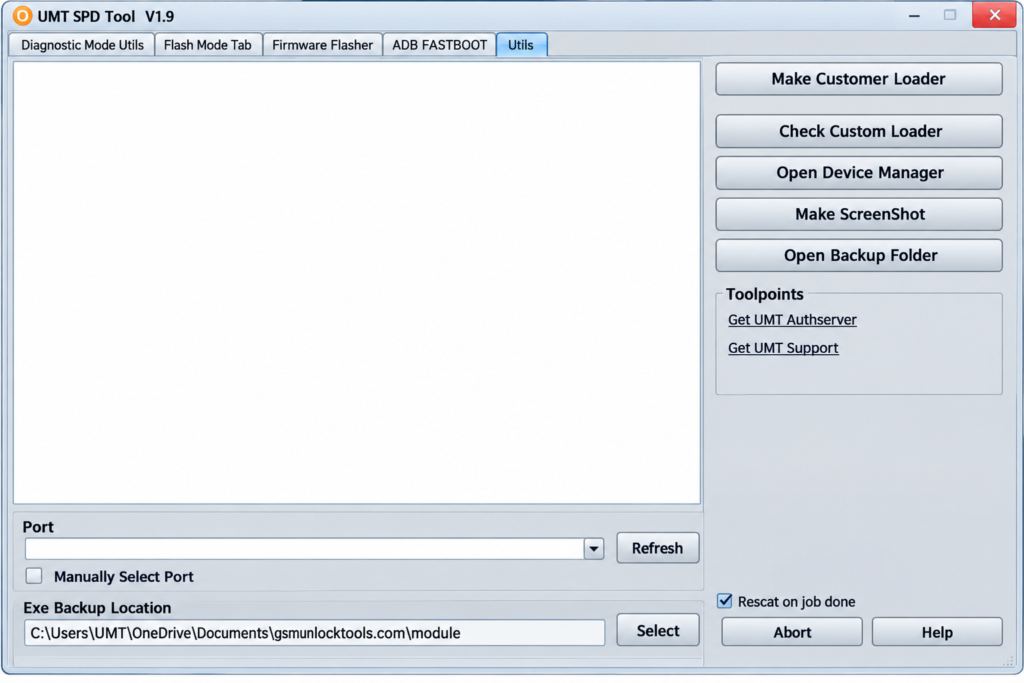
UMT SPD Tool is a Windows-based mobile servicing tool for smartphones. It supports Unisoc (SPD) chipsets. Instead of relying on general MTK or Qualcomm utilities, users can use the Unisoc module for supported devices. They perform tasks via Diag Mode, Flash Mode, ADB, and Fastboot connections.
Key Features of the UMT SPD Tool
Diag Mode and Flash Mode
Diag Mode allows the tool to communicate with supported Unisoc phones for device information, diagnostics, backups, reset operations, and other supported servicing functions.
Unisoc Firmware Flashing
The tool supports flashing compatible Unisoc/Spreadtrum firmware, including supported PAC and XML firmware files. A correct firmware loader is important because using the wrong firmware can cause boot or software problems.
FRP and Factory Reset
It includes FRP servicing and factory-reset functions for supported devices. These options can be useful during phone servicing when performing a factory reset.
IMEI, SN and Device Information
The module provides supported functions for reading and servicing device information such as IMEI, Serial Number, Bluetooth, and Wi-Fi data.
NVRAM and Security Backup
Supported devices can provide NVRAM and security-data backup and restore options. Creating a backup before major servicing can help technicians preserve important device information.
Bootloader Unlock and Relock
UMT SPD Tool includes bootloader management functions for compatible Unisoc devices. Depending on the model, users may be able to unlock or relock the bootloader.
What’s new in the UMT SPD Tool?
- Improved Unisoc/Spreadtrum device support
- Better FRP servicing for supported models
- Improved firmware flashing and device connection
- Enhanced custom loader support
- Custom loader creation from compatible firmware
- Improved NVRAM backup and restore
- Better security backup and restore functions
- Improved bootloader unlock/relock operations
- Enhanced RPMB read/write support on compatible devices
- Improved UFS device handling
System Requirements
| Requirement | Details |
| Operating System | Windows 7, 8, 10, or 11 |
| RAM | 2 GB or more |
| Storage | 500 MB+ free space |
| USB Port | Required for connecting the phone |
| Drivers | UMT and Unisoc USB drivers |
| Hardware | Compatible UMT dongle/box with activation |
How to Download & Install the UMT SPD Tool?
- Download the UMT SPD Tool package from a trusted source.
- Extract the downloaded archive if it is compressed.
- Install the required UMT and Unisoc USB drivers.
- Connect the compatible UMT hardware.
- Run the setup file and complete the installation.
- Open the UMT Pro Unisoc Module.
- Select the required Unisoc servicing function.
- Connect the supported phone using the correct mode.
- Start the operation and keep the USB connection stable.
Pros & Cons
| Pros | Cons |
| Supports Unisoc/Spreadtrum devices | Requires compatible UMT hardware |
| Supports firmware flashing and FRP servicing | Device compatibility can vary |
| Includes NVRAM, Diag Mode, ADB & Fastboot | Incorrect firmware may cause issues |
| Offers bootloader and custom-loader functions | Some features require technical knowledge |
| Provides multiple repair tools in one module | Some operations may erase user data |
Also check: QC Unlocker Tool V2 Free Setup Download Latest Version [2026]
Conclusion
UMT SPD Tool provides servicing for supported Unisoc and Spreadtrum Android phones. It brings firmware flashing, Diag Mode, Flash Mode, FRP and factory-reset servicing, NVRAM and security backups, bootloader management, ADB, Fastboot, custom loader support, and other device utilities. Its compatibility is not universal, so users should always check the exact model, chipset, firmware, Android version, security patch, and UMT activation requirements before performing any operation.
FAQ’s
Can UMT SPD Tool Remove FRP?
UMT SPD Tool provides FRP servicing functions for supported Unisoc/Spreadtrum devices. Compatibility depends on the model, Android version, security patch, and available servicing method.
Can UMT SPD Tool Flash Unisoc Firmware?
Yes. The tool supports compatible Unisoc firmware flashing, including supported PAC and XML firmware packages.
Can UMT SPD Tool Unlock the Bootloader?
Bootloader unlock and relock functions are available for selected compatible devices. Manufacturer restrictions and device security can affect availability.
Does UMT SPD Tool Support ADB and Fastboot?
Yes. UMT SPD Tool includes supported ADB and Fastboot functions for device information, rebooting, partition-related operations, and other basic servicing tasks.
Is UMT SPD Tool Free?
The UMT Pro Unisoc Module requires compatible UMT hardware and activation, so it should not be considered a completely free standalone servicing application.
![Sony Flash Tool V0.9.36.0 Free Download Latest Version [2026]](https://gsmunlocktools.com/wp-content/uploads/2026/09/Sony-Flash-Tool-V0.9.36.0-768x576.png)