TPS Tool v3.1 Download (Latest Version 2026) | FRP, Flash, IMEI & Screen Unlock
Forgotten FRP locks, screen locks, boot loops, and firmware errors can prevent an Android device from functioning properly. TPS Tool offers a practical solution with support for ADB, Fastboot, Qualcomm, MediaTek (MTK), and Unisoc (SPD) devices, enabling firmware flashing, bootloader operations, and Android software repair across various leading brands, thereby helping technicians complete servicing efficiently.
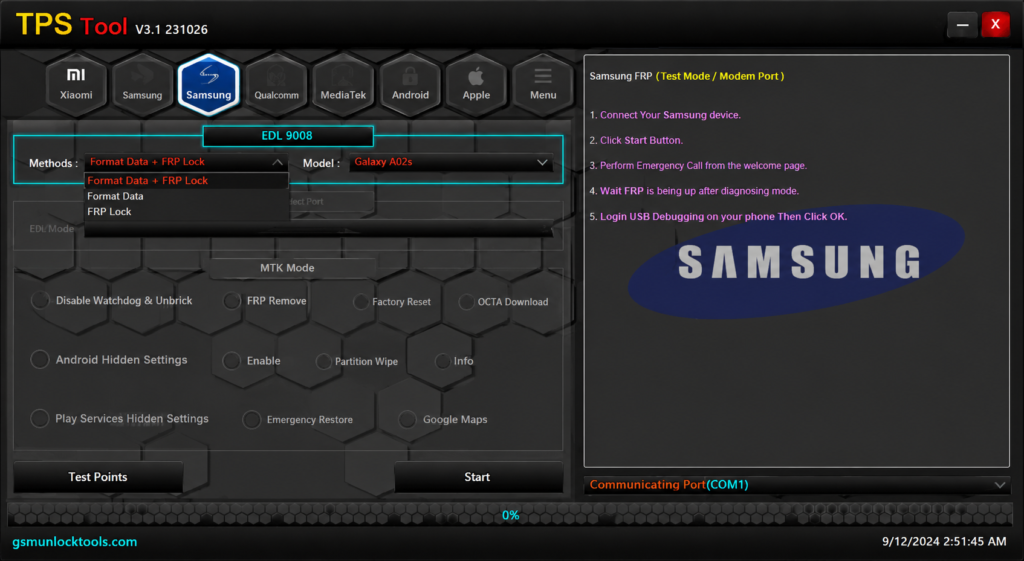
What is the TPS Tool v3.1?
TPS Tool v3.1 is a Windows-based Android servicing software designed to repair smartphones. It helps technicians perform FRP removal, firmware flashing, screen lock unlocking, IMEI repair, bootloader operations, factory reset, and device maintenance through ADB, Fastboot, Download Mode, EDL, etc. The tool supports popular Android brands, including Samsung, Xiaomi, Redmi, POCO, OPPO, Vivo, Realme, Huawei, Infinix, Tecno, and Nokia, making it a practical solution for everyday software repair tasks.
Key Features of the TPS Tool
FRP Unlock
The Tool helps technicians to remove FRM from smartphones to make the mobile accessible. It uses both ADB and fastboot mode to repair the device.
Screen Lock Removal
TPS Tool v3.1 helps remove PIN, password, pattern, and screen locks on Android devices. It works with Samsung, Xiaomi, OPPO, Vivo, Realme, Huawei, Infinix, Tecno, Qualcomm, MediaTek (MTK), and Unisoc (SPD) devices through ADB, Fastboot, Download Mode, and EDL.
ADB & Fastboot Support
TPS Tool includes ADB and Fastboot functions. It allows users to perform FRP removal, reboot operations, device information, screen lock removal, and firmware-related tasks on devices from Samsung, Xiaomi, OPPO, Vivo, Realme, Huawei, and other Android brands through a USB connection.
Driver Installation
The Tool includes Qualcomm, MediaTek (MTK), Unisoc (SPD), and ADB drivers, allowing Windows PCs to communicate with Android devices. Proper driver installation ensures stable connections for firmware flashing, FRP removal, device detection, and other software servicing operations.
Stable and Secure Operations
The tool provides stable and reliable Android servicing across Qualcomm, MediaTek (MTK), and Unisoc (SPD) devices. It helps perform firmware flashing, FRP removal, screen unlock, and bootloader operations with stable communication.
MTK Security & Bootloader Operations
It provides MediaTek (MTK) servicing features, including temporary authentication bypass, bootloader lock/unlock, FRP reset, NVRAM/NVDATA backup, restore, erase, and software error repair. Technicians can troubleshoot boot issues, restore essential partitions, and perform advanced Android software maintenance.
User-friendly interface
The TPS tool comes with a better UI, so the user doesn’t get stuck at any moment during the repair process.
TPS Tool v3.1 Pros and Cons
| Pros | Cons |
| Easy-to-use interface for Android servicing. | Requires technical knowledge for advanced functions. |
| Supports Qualcomm, MediaTek (MTK), and Unisoc (SPD) devices. | Not an official tool from Android device manufacturers. |
| Performs FRP removal, firmware flashing, screen unlock, and bootloader operations. | Some antivirus programs may report false-positive alerts. |
| Compatible with multiple brands, including Samsung, Xiaomi, OPPO, Vivo, Realme, Huawei, Infinix, and Tecno. | Limited official documentation and user guides are available. |
| Receives regular updates with new device support and bug fixes. | Certain features may not support every model or Android security patch. |
How To Download the TPS Tool V3.1?
- Download the latest TPS Tool v3.1 package from a trusted source and extract the ZIP file using WinRAR or 7-Zip.
- Install the required Qualcomm, MediaTek (MTK), Unisoc (SPD), and ADB drivers on your Windows PC.
- Run TPS Tool v3.1 as Administrator and allow all required permissions.
- Connect your Android device to the PC using a USB cable.
- Boot the device into the required mode, such as ADB, Fastboot, Download Mode, EDL, or Preloader Mode, depending on the operation.
- In the tool, select the desired function, such as FRP Removal, Screen Lock Removal, Firmware Flashing, IMEI Repair, or Bootloader Operations.
- Click Start or the required action button and wait for the process to complete without disconnecting the device.
- Once the operation finishes, the device will reboot automatically. Verify that the selected task has been completed successfully.
Also Check: Download Android Multi Tool v1.3.5.8 Latest Setup for Windows 2026
Download Information
| Download Information | Details |
| Tool Name | TPS Tool |
| Latest Version | V3.1 |
| File Size | 189.47 MB |
| File Type | ZIP / RAR Compressed File |
| Extraction Tool | WinRAR or 7-Zip |
| Supported Operating System | Windows 7 / 8 / 10 / 11 (32-bit & 64-bit) |
| Password | GsmUnlockTools |
Conclusion
TPS Tool v3.1 is a Windows-based Android servicing tool that supports Samsung, Xiaomi, Redmi, POCO, OPPO, Vivo, Realme, and many other devices powered by Qualcomm, MediaTek (MTK), and Unisoc (SPD) chipsets. It includes FRP removal, firmware flashing, screen lock removal, IMEI repair, bootloader operations, factory reset, and ADB/Fastboot functions, making it a practical solution for Android software servicing.
FAQ’s
Is TPS Tool v3.1 free to use?
Some releases are available for free, while others may require activation or registration, depending on the source from which the tool is obtained.
Does TPS Tool v3.1 work offline?
Yes. After installation and setup, many functions can be performed offline, although some features may depend on the selected tool version or service.
Which Android versions are supported by TPS Tool v3.1?
According to available documentation, TPS Tool v3.1 supports many devices running Android 11, Android 12, Android 13, Android 14, and Android 15, depending on the model and security patch level.
Is TPS Tool v3.1 safe to use?
The tool is generally used by mobile repair technicians. For security, download it only from a trusted source and install the required drivers before performing any servicing operation.