HalabTech Tool v1.1 Free Download for MTK & Qualcomm [2026]
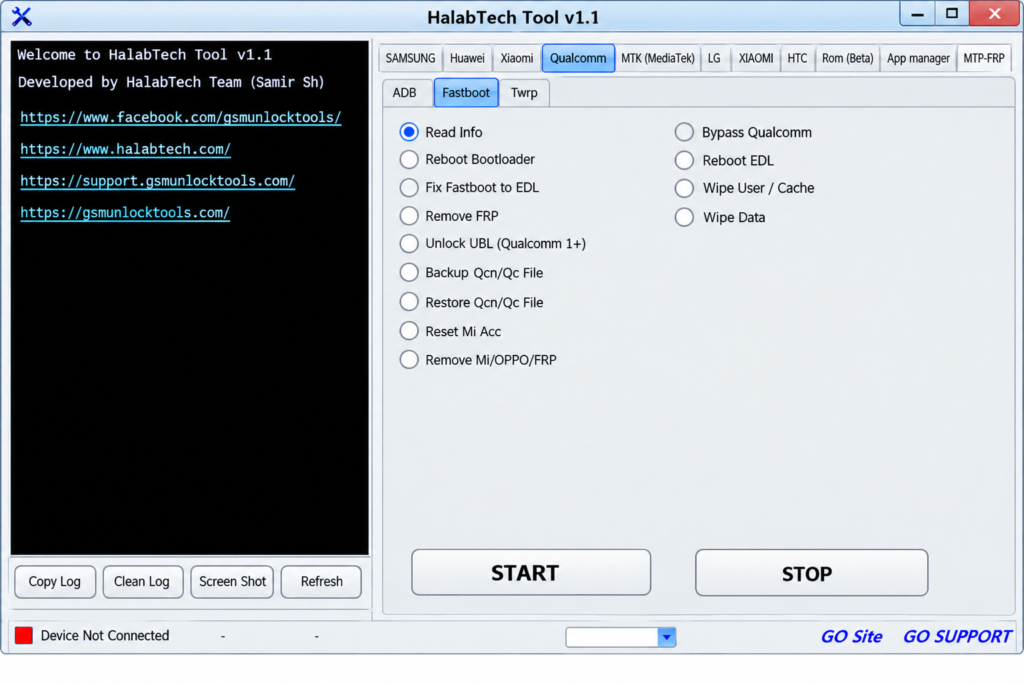
If you need to flash, unlock, repair, or service an Android smartphone. HalabTech Tool provides a powerful solution for mobile technicians and Android users. It supports popular brands and platforms, including OPPO, Vivo, Xiaomi, MediaTek, and Qualcomm. It helps handle common software servicing tasks, including firmware flashing, FRP reset, screen-lock removal, bootloader unlock and relock, DIAG enablement, Auth Bypass, userdata formatting, Mi Account reset, device information reading, and software maintenance.
What is the HalabTech Tool?
HalabTech Tool is an Android servicing and mobile repair tool. It helps users flash firmware, troubleshoot software issues, reset FRP, manage bootloader operations, format partitions, read device information, and perform other software maintenance tasks. It supports a range of Android devices and platforms, including MediaTek, Qualcomm, OPPO, Vivo, Xiaomi, Samsung, and other popular smartphone brands.
Key Features of the Halabtech Tool
Firmware Flashing & Repair
Halabtech Tool flashes compatible Android devices and resolves common firmware and software problems. It helps technicians perform supported flashing and repair operations efficiently.
FRP & Screen Lock Servicing
The tool services compatible devices affected by FRP or certain screen-lock issues. It is useful for Android software maintenance after supported reset and servicing procedures.
Bootloader Operations
The tool performs supported bootloader unlock and relock operations. These functions can assist with advanced device servicing and software maintenance.
Auth Bypass & DIAG
The tool provides Auth Bypass and DIAG-related functions for supported devices. These features are intended for compatible chipsets and servicing workflows.
Mi Account Servicing
The tool includes supported Xiaomi Mi Account servicing functions. Technicians can use available functions for compatible Xiaomi devices.
What’s New in the HalabTech Tool?
- Expanded Android device support
- Improved FRP servicing
- Updated MediaTek support
- Enhanced Qualcomm support
- Improved bootloader functions
- Updated DIAG functions
- Expanded firmware flashing support
- More supported smartphone brands
System Requirements
| Requirement | Details |
| OS | Windows PC |
| USB | USB port + cable |
| Drivers | MTK/Qualcomm USB drivers |
| Internet | Required for some functions |
| Device | Compatible Android phone |
| Storage | Space for tool & firmware |
| Access | Administrator privileges |
How to Download & Install the HalabTech Tool?
- Download the HalabTech Tool from a trusted source.
- Click on the download link.
- Wait until the download is complete.
- Extract all files to your Desktop.
- Open the extracted folder.
- Enable USB debugging when using ADB functions.
- Open the tool that is downloaded.
- Run the tool as an administrator.
- The tool will open on your PC screen.
- Enjoy using the tool.

Pros & Cons
| Pros | Cons |
| Multi-brand Android support | Features vary by device |
| MTK & Qualcomm support | Requires compatible drivers |
| Firmware flashing | Incorrect flashing may cause issues |
| FRP servicing | Some functions require authentication |
| Multiple repair functions | Requires technical knowledge |
Also check: Moto FRP Tool Free Download for Motorola Devices [2026]
Conclusion
HalabTech Tool is a useful Android servicing solution for flashing, FRP servicing, bootloader operations, device information, and software repair. With MTK and Qualcomm support and compatibility with multiple Android brands, it can help mobile technicians handle a range of supported device servicing tasks.
FAQ’s
Does HalabTech Tool support MTK devices?
Yes, it provides various servicing functions for supported MediaTek devices.
Does HalabTech Tool support Qualcomm?
Yes, selected versions provide servicing functions for compatible Qualcomm devices.
Can it reset FRP?
HalabTech Tool includes FRP servicing functions for certain supported devices.
Is HalabTech Tool suitable for mobile technicians?
Yes, it is designed for mobile technicians and advanced users who perform supported Android software servicing tasks.
Does it support Xiaomi devices?
Yes, various Xiaomi models and servicing functions are supported depending on the tool version.
Can it unlock bootloaders?
It provides bootloader unlock and relock functions for selected compatible devices.
Can it read device information?
Yes, supported functions can display important hardware and software information.
![Android Win Tool v2.1.8: Download the Latest Version for Windows [2026]](https://gsmunlocktools.com/wp-content/uploads/2026/08/android-win-tool-v2-1-8-768x576.png)