
HTH ND Android Tool V1.0.0 Free Download Latest Version [2026]
If you are facing MediaTek device issues with FRP, data formatting, or bootloader management. HTH ND Android Tool offers a lightweight solution for supported Oppo, Vivo, and Infinix smartphones. It features BROM and Preloader operations, FRP Erase, Data Erase, Format Data, Bootloader Unlock/Relock, EMI Preloader, and MiCloud management. An all-in-one, convenient Android servicing tool. Download the HTH ND Android Tool and enjoy using it.
What is the HTH ND Android Tool?
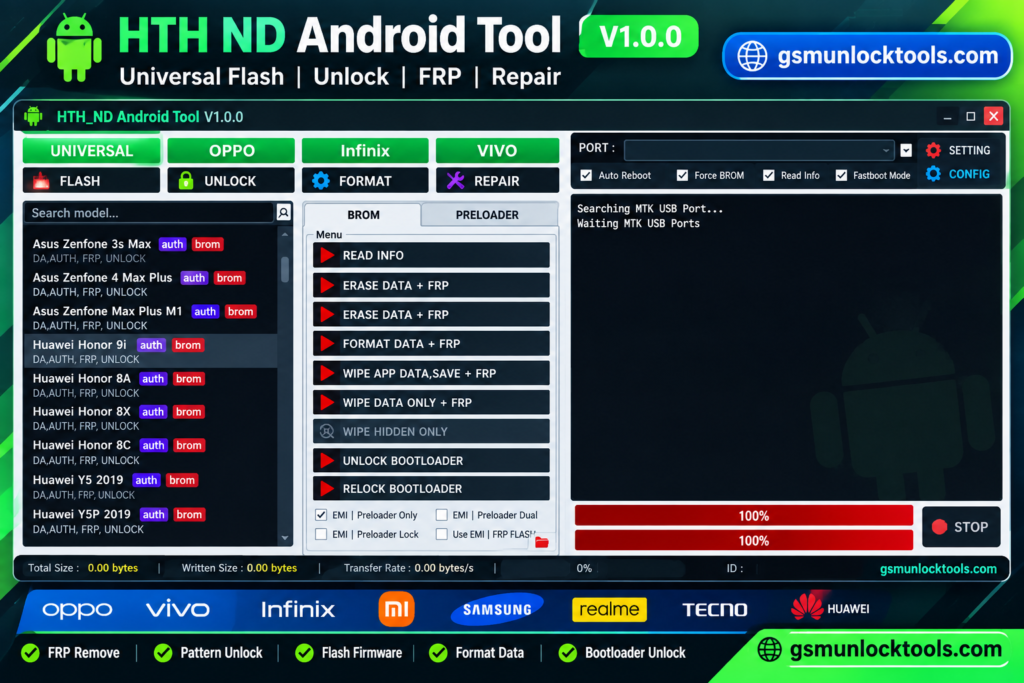
HTH ND Android Tool is a lightweight, testing-based Android servicing utility tool. It is designed for supported MediaTek smartphones from Oppo, Vivo, and Infinix. It provides BROM and Preloader operations to help users perform various device maintenance tasks, including FRP Erase, Data Erase, Format Data, Read Device Info, and Bootloader Unlock/Relock. The tool also includes EMI Preloader and MiCloud management features, offering multiple Android servicing options in one application.
Key Features of HTH ND Android Tool
MediaTek BROM Support
HTH ND Android Tool supports BROM mode operations on compatible MediaTek devices. It provides access to supported servicing functions for device maintenance.
Preloader Mode Support
It offers Preloader mode support for selected MTK smartphones. It helps users access available device servicing operations.
FRP Erase
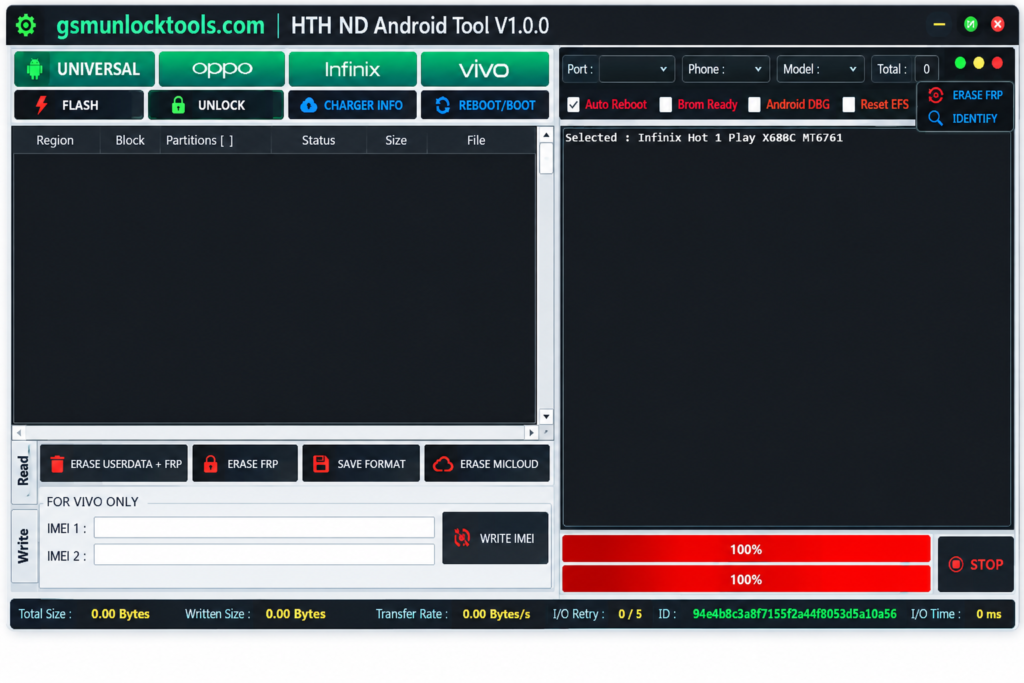
The tool includes an FRP Erase feature for supported devices. It provides an option to address Factory Reset Protection during authorized servicing.
Data Erase
This Tool allows users to erase device data on compatible smartphones. This can help prepare a device for maintenance or a fresh setup.
Format Data
HTH ND Android Tool provides a Format Data function for supported MediaTek devices. Formatting may remove personal data and settings from the device.
Read Device Info
HTH ND Android Tool includes a Read Info option to retrieve available device information. This can help identify a connected smartphone before servicing.
Bootloader Unlock/Relock
The tool offers bootloader unlock and relock options on supported devices. Availability depends on the smartphone model and its security restrictions.
EMI Preloader Support
HTH ND Android Tool includes EMI Preloader-related functionality for compatible devices. The available operations depend on the tool version and device support.
MiCloud Management
HTH ND Android Tool provides MiCloud-related management options within the tool. Supported functions may vary depending on device compatibility.
What’s new in the HTH ND Android Tool?
- BROM & Preloader Support
- FRP & Data Operations
- Bootloader Management
- EMI Preloader & MiCloud Features
- Multi-Brand Device Support
- Lightweight Tool Interface
- Testing-Based Initial Release
- Read Device Information
- Expanded Model Support in Future Releases
- Multiple Android Servicing Functions
- MediaTek Device Maintenance Support
System requirements
| Requirement | Details |
| Operating System | Windows (version not confirmed) |
| Device Compatibility | Supported Oppo, Vivo, and Infinix smartphones |
| Chipset | MediaTek (MTK) |
| Connection | USB cable |
| USB Drivers | Compatible MediaTek USB drivers |
| Required Modes | BROM and Preloader |
| Tool Version | HTH ND Android Tool V1.0.0 |
| Password | 123 |
How to Download & Install HTH ND Android Tool?
- Download HTH ND Android Tool from a trusted source.
- Click on the download link.
- Wait for the download to complete.
- Extract all files to your Desktop
- Open the extracted folder
- Enable USB debugging when using ADB functions.
- Open the tool that is downloaded.
- Run the tool as admin.
- The tool will open on your PC screen.
- Enjoy using the tool.
Pros & Cons
| Pros | Cons |
| Supports selected Oppo, Vivo, and Infinix devices. | Limited supported models. |
| Offers MediaTek BROM and Preloader operations. | Compatibility varies by device. |
| Includes FRP Erase and Data Erase. | Data erasure can permanently delete files. |
| Provides Format Data functionality. | Formatting removes user data. |
| Includes Bootloader Unlock/Relock. | Bootloader operations may affect security. |
| Features EMI Preloader and MiCloud management. | Features may vary by model. |
Also check: TTA EDL Tool V1.0.4 Free Download for MI Account & EDL Repair [2026]
Conclusion
HTH ND Android Tool is a lightweight MediaTek servicing utility designed for supported Oppo, Vivo, and Infinix smartphones. With features like BROM and Preloader support, FRP Erase, Data Formatting, and Bootloader Management, it offers useful options for Android maintenance and repair tasks. Since this is a testing-based release with limited model support, users should check device compatibility before using the tool.
FAQ’s
Does HTH ND Android Tool support Preloader mode?
Yes, the tool description lists Preloader support for compatible devices.
Does the tool support data formatting?
Yes, it includes a Format Data feature for compatible devices.
Can this Tool erase device data?
Yes, it lists a Data Erase option. This operation may permanently delete personal information.
What is EMI Preloader support?
The tool includes EMI Preloader-related functions for compatible MediaTek devices.
Is HTH ND Android Tool compatible with all Android phones?
No. It is a testing-based release with limited model support, so check compatibility before use.
![IMEI Write Tool R3.0.0001 Free Download for Windows [2026]](https://gsmunlocktools.com/wp-content/uploads/2026/09/imei-write-tool-r3-0-0001-768x576.png)
![QCN Tool V1 Free Download for QCN Edit & IMEI [2026]](https://gsmunlocktools.com/wp-content/uploads/2026/09/QCN-Tool-V1-Free-Download-for-QCN-Edit-IMEI-2026-768x576.png)
![Android Root Tool v6.0.5.0 Download for Windows Latest Version [2026]](https://gsmunlocktools.com/wp-content/uploads/2026/08/android-root-tool-v6-0-5-0-download-768x576.png)
![Android Win Tool v2.1.8: Download the Latest Version for Windows [2026]](https://gsmunlocktools.com/wp-content/uploads/2026/08/android-win-tool-v2-1-8-768x576.png)