SP Flash Tool V6.2404 Download for MediaTek Devices Latest Version [2026]
When a MediaTek Android phone is stuck in a bootloop, needs a firmware update, or requires flashing a stock ROM or recovery. SP Flash Tool is a Windows-based utility for MediaTek devices that lets users flash compatible Stock ROMs, recovery images, and firmware packages using a Scatter file.
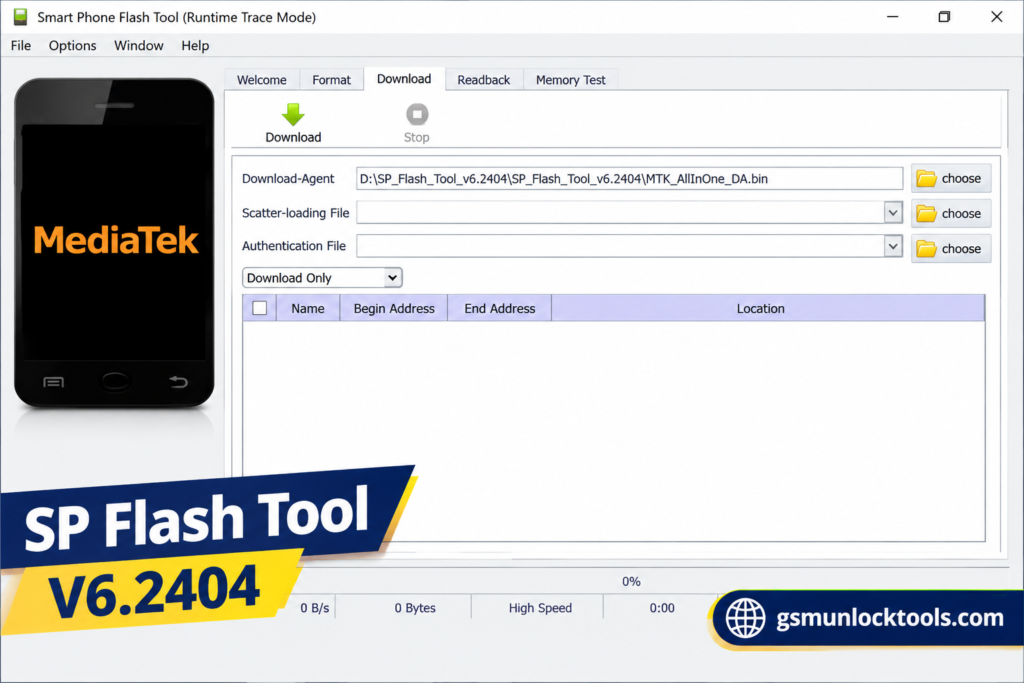
What is the SP Flash Tool?
SP Flash Tool is a Windows-based firmware flashing tool. It is used for MediaTek Android devices. It helps users flash Stock ROMs, recovery files, and firmware using a compatible Scatter file. It is useful for fixing supported software problems such as bootloops, firmware errors, and failed updates. Some modified versions also include MediaTek Auth Bypass features for selected devices.
Key Features of the SP Flash Tool
MediaTek Firmware Flashing
SP Flash Tool is designed for flashing firmware on supported MediaTek smartphones and tablets. It can install compatible stock ROM packages through the flashing interface.
Scatter File Support
The tool supports Scatter files that contain the partition information required for compatible MediaTek firmware packages. Users can load the Scatter file before starting the flashing process.
Format & Download
The Format & Download option can format supported device partitions and then install firmware. This operation may erase user data and should be used carefully.
Readback Function
The Readback feature allows supported partitions to be read from a connected device and saved as image files. This can be useful for creating backups before servicing.
Partition Selection
Users can select individual firmware partitions when performing supported flashing operations. This provides greater control over the firmware installation process.
What’s new in the SP Flash Tool?
- Updated MediaTek flashing support
- Built-in authentication-related options in modified builds
- Improved Scatter file handling
- Firmware partition selection
- Updated flashing procedures
- Recovery image flashing
- Formatting and reset options
- Improved device communication
- Additional MediaTek device compatibility
System Requirements
| Requirement | Details |
| OS | Windows 7 / 10 / 11 |
| RAM | 2 GB minimum |
| Processor | Intel / AMD Dual-Core |
| Storage | 500 MB free |
| USB Port | Required |
| Drivers | MediaTek USB drivers |
| USB Cable | Reliable data cable |
How to Download & Install the SP Flash Tool?
- Download the SP Flash Tool from a trusted source.
- Click on the download link.
- Wait until the download is complete.
- Extract all files to your Desktop.
- Open the extracted folder.
- Enable USB debugging when using ADB functions.
- Open the tool that is downloaded.
- Run the tool as admin.
- The tool will open on your PC screen.
- Enjoy using the tool.

Pros & Cons
| Pros | Cons |
| Supports MediaTek devices | Mainly designed for MTK devices |
| Scatter file support | Incorrect firmware can cause boot problems |
| Stock ROM flashing | Flashing may erase user data |
| Recovery flashing | Requires compatible USB drivers |
| Memory testing functions | Advanced operations need technical knowledge |
| Partition selection | Compatibility varies by chipset and security level |
| Simple flashing interface | Modified builds may come from unofficial sources |
Also check: Fastboot Flash Tool V1.0.1.2 Free Download Setup Latest Version [2026]
Conclusion
SP Flash Tool is a useful firmware flashing solution for compatible MediaTek Android devices. With support for Stock ROM flashing, recovery installation, Scatter files, partition management, and selected Auth Bypass functions, it can help technicians handle various Android software and firmware problems. Always use the correct firmware and drivers for your exact device to avoid data loss or flashing errors.
FAQ’s
Can SP Flash Tool fix a bricked Android device?
SP Flash Tool can help with certain software-related brick conditions by allowing compatible firmware to be flashed.
What is the Memory Test feature in SP Flash Tool?
Memory Test is used to check supported memory components such as RAM, eMMC, and NAND Flash.
What does Parameter Setting do in SP Flash Tool?
Parameter Setting provides options for configuring certain flashing parameters, including download and format-related settings.
Does SP Flash Tool support firmware updates?
Yes, compatible firmware packages can be installed to update or repair the software of supported devices.
What drivers are required for SP Flash Tool?
MediaTek USB-VCOM drivers are commonly required so the Windows PC can properly detect a compatible MTK device.


![Xiaomi Tool V2026.01.18 Free Download Latest Version [2026]](https://gsmunlocktools.com/wp-content/uploads/2026/09/xiaomi-tool-v2026-01-18-768x576.png)