Fastboot Flash Tool V1.0.1.2 Free Download Setup Latest Version [2026]
When an Android phone gets stuck in Fastboot mode, suffers a soft brick or firmware error, or needs a clean stock firmware installation. Fastboot Flash Tool provides a simpler Windows-based solution for supported Android devices. It includes useful options such as Fastboot Info, Fastboot Error Fix, Fastboot FRP Lock, Fastboot to EDL, Open BAT File, Open Scatter File, and partition management.
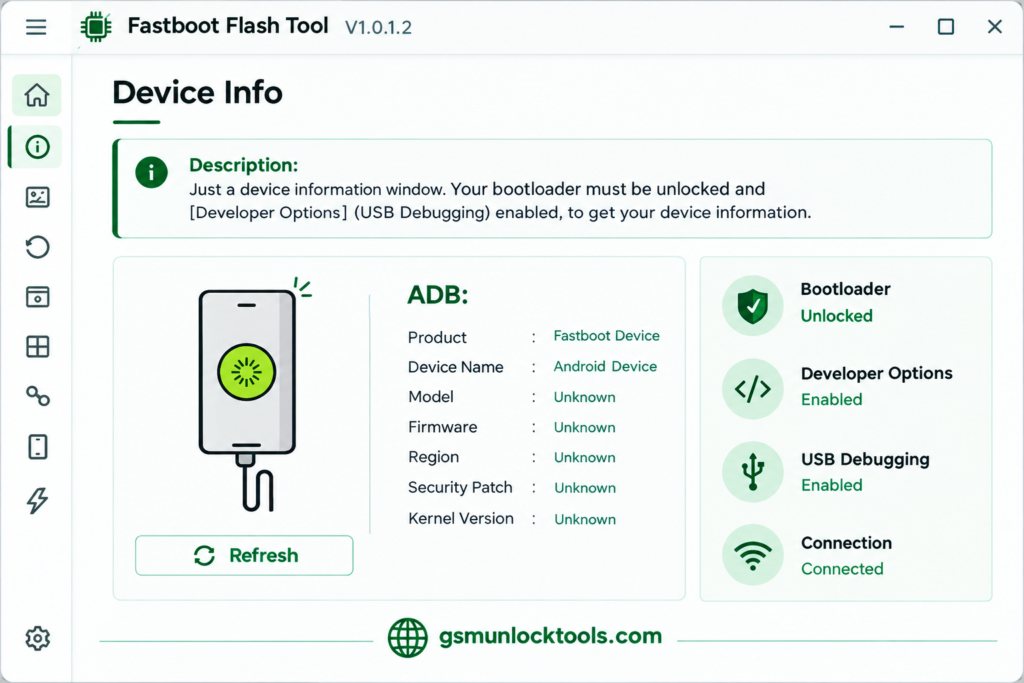
What is the Fastboot Flash Tool?
Fastboot Flash Tool is a Windows-based tool. It is designed to help users handle flashing, firmware errors, Fastboot issues, and device recovery tasks on compatible smartphones. The tool also includes advanced options such as Fastboot-to-EDL, Scatter file, and BAT file support for compatible devices. Its available features depend on the device model, chipset, firmware package, and connection mode.
Key Features of the Fastboot Flash Tool
Fastboot Firmware Flashing
The tool helps flash compatible Android firmware while the device is connected in Fastboot mode. It can be useful when reinstalling or repairing supported system software.
Partition Selection
The tool provides partition-related options that allow users to select specific firmware components when supported by the device and flashing package.
Fastboot Error Fix
It provides a range of functions for troubleshooting common Fastboot-related problems, making firmware servicing easier for supported devices.
Fastboot to EDL
The tool includes a Fastboot-to-EDL option for compatible Qualcomm devices. EDL is a low-level Qualcomm emergency download mode used for certain device recovery and firmware servicing tasks.
Scatter File Support
Selected versions provide Scatter file support for compatible MediaTek firmware packages and devices.
BAT File Support
The tool can work with supported BAT-based flashing scripts, helping automate compatible firmware flashing procedures.
What’s new in the Fastboot Flash Tool?
- Improved Fastboot firmware flashing
- Updated device information functions
- Fastboot error-fixing options
- Fastboot-to-EDL support for compatible devices
- Scatter file support
- BAT file support
- Improved partition selection
- Better device connection handling
- Interface improvements
System Requirements
| Requirement | Details |
| OS | Windows 7 / 10 / 11 |
| RAM | 4 GB |
| Processor | Intel / AMD Dual-Core |
| Storage | 500 MB |
| USB Port | Required |
| Drivers | Android USB drivers |
| Internet | Required for some functions |
How to Download & Install the Fastboot Flash Tool?
- Download the Fastboot Flash Tool from a trusted source.
- Click on the download link.
- Wait until the download is complete.
- Extract all files to your Desktop.
- Open the extracted folder.
- Enable USB debugging when using ADB functions.
- Open the tool that is downloaded.
- Run the tool as admin.
- The tool will open on your PC screen.
- Enjoy using the tool.
Pros & Cons
| Pros | Cons |
| Supports Fastboot firmware flashing | Device compatibility varies |
| Provides a graphical interface | Incorrect firmware can cause problems |
| Includes partition selection | Some operations require technical knowledge |
| Supports selected EDL operations | Qualcomm EDL may have additional requirements |
| Scatter and BAT file support | Compatible USB drivers are required |
| Helps troubleshoot Fastboot issues | Flashing can erase user data |
Also check: Prime Tool V9.0 Full Setup Download: Latest Version [2026]
Conclusion
Fastboot Flash Tool is an Android servicing tool. It is used for Fastboot flashing, partition management, device information, Scatter and BAT file support, and Fastboot-to-EDL options, making firmware servicing more convenient on compatible devices. Whether you need to reinstall firmware, troubleshoot Fastboot issues, or perform advanced device maintenance, the tool brings several useful functions into one Windows application.
FAQ’s
Can Fastboot Flash Tool flash Android firmware?
Yes, it can flash compatible firmware packages on supported devices connected through Fastboot mode.
Does the tool support Qualcomm devices?
Yes, it supports selected Qualcomm devices, including certain EDL-related operations.
What is Fastboot-to-EDL?
Fastboot-to-EDL lets you put compatible Qualcomm devices into Emergency Download Mode from a supported Fastboot state.
Does Fastboot Flash Tool support MediaTek devices?
Selected functions support MediaTek devices, particularly where compatible Fastboot or Scatter-based firmware packages are available.
What is a Scatter file?
A Scatter file contains partition information used by certain MediaTek firmware packages and flashing tools.
Can I flash individual partitions?
Yes, supported versions provide partition-selection options, allowing specific firmware partitions to be selected when compatible with the device.
Can Fastboot Flash Tool work with BAT files?
Yes, selected versions provide BAT file support for compatible firmware packages and flashing procedures.
![Xiaomi Tool V2026.01.18 Free Download Latest Version [2026]](https://gsmunlocktools.com/wp-content/uploads/2026/09/xiaomi-tool-v2026-01-18-768x576.png)
![Sony Flash Tool V0.9.36.0 Free Download Latest Version [2026]](https://gsmunlocktools.com/wp-content/uploads/2026/09/Sony-Flash-Tool-V0.9.36.0-768x576.png)