OMH MTK Toolkit Tool V1.0 Free Download by OMH Min Htet [2027]
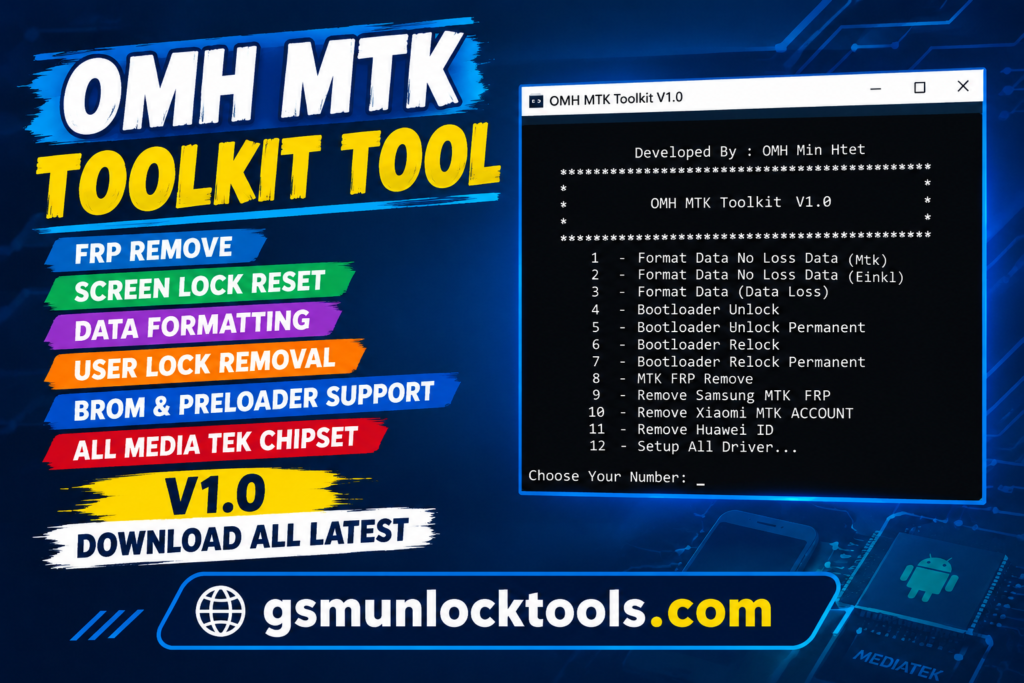
When your MediaTek smartphone faces FRP lock issues, a forgotten screen PIN or pattern, or data-related problems, the OMH MTK Toolkit tool is a Windows-based mobile servicing utility for supported MediaTek devices. OMH MTK Toolkit is a Windows-based mobile servicing utility designed for supported MediaTek devices. It advertises functions such as FRP removal, screen lock reset, data formatting, user lock removal, and other device servicing operations.
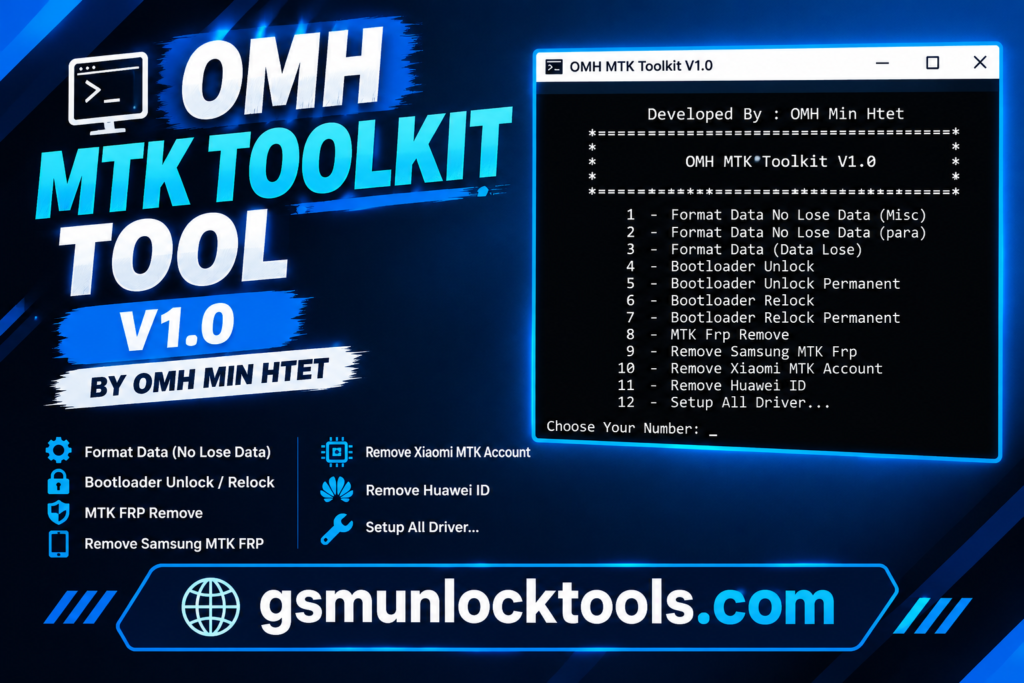
What is the OMH MTK Toolkit Tool?
OMH MTK Toolkit is a Windows-based mobile servicing tool. It supports compatible MediaTek smartphones and offers features such as FRP removal, screen PIN or pattern reset, user lock removal, and data formatting. It may help technicians address specific software-lock and servicing issues on supported devices.
Key Features of the OMH MTK Toolkit Tool
User lock removal
The tool provides user-lock servicing functions for selected MTK smartphones. The supported operations depend on the device and its security configuration.
Data formatting
The tool offers formatting functions for compatible MediaTek devices. The formatting may erase stored data, so back up important files beforehand.
BROM mode support
The tool Advertises support for BootROM mode on compatible MediaTek chipsets. The available operations depend on the device and connection method.
Preloader mode support
Supports advertised servicing operations through Preloader mode on selected MTK devices. Compatibility varies by chipset and device configuration.
Authentication bypass
The tool includes advertised authentication-bypass functionality for certain supported devices. Availability depends on the chipset, security protections, and tool version.
What’s New in the OMH MTK Toolkit Tool?
- MediaTek chipset device servicing support
- BROM and Preloader mode support
- Built-in authentication-bypass functionality
- FRP and screen lock servicing options
- Data formatting and user lock removal
- Command-line interface support
System Requirements
| Requirement | Specification |
| OS | Windows 7, 8, 10, or 11 |
| Processor | Intel or AMD processor |
| RAM | Sufficient memory to run the toolkit |
| Storage | Free disk space for the tool files |
| USB drivers | Compatible MediaTek USB drivers |
| Device compatibility | Supported MediaTek (MTK) smartphone |
| Connection mode | BROM or Preloader mode, where supported |
How to Download & Install the OMH MTK Toolkit Tool?
- Download the OMH MTK Toolkit Tool from a trusted source.
- Click on the download link.
- Wait until the download is complete.
- Extract all files to your Desktop.
- Open the extracted folder.
- Enable USB debugging when using ADB functions.
- Open the downloaded tool.
- Run the tool as admin.
- The tool will open on your PC screen.
- Enjoy using the tool.
Pros & Cons
| Pros | Cons |
| Supports compatible MediaTek devices | Limited to supported MTK chipsets |
| Offers FRP and screen lock servicing | Compatibility varies by device |
| Supports BROM and Preloader modes | May require specific USB drivers |
| Includes data formatting functions | Formatting may erase user data |
| Advertises built-in authentication bypass | Availability depends on device security |
| Lightweight Windows-based utility | Verified update information is limited |
| Supports selected multi-brand devices | Not all models are supported |
Also check: eMMC DL Tool V5.2.0 Free Download for Windows [2027]
Conclusion
OMH MTK Toolkit is a Windows-based mobile servicing utility designed for compatible MediaTek smartphones. It advertises features such as FRP servicing, screen lock removal, data formatting, and support for BROM and Preloader modes. Before using the tool, verify device compatibility, install the required drivers, and back up important data to avoid unnecessary data loss.
FAQ’s
What is the OMH MTK Toolkit used for?
The toolkit advertises functions for FRP locks, forgotten screen PINs or patterns, and user-lock servicing. It also offers data formatting and selected device maintenance operations. Available functions depend on the device model and software version.
Which devices does the OMH MTK Toolkit support?
The tool supports compatible MediaTek-powered smartphones from selected brands, including Oppo, Vivo, and Xiaomi. It does not support every model from these manufacturers. Check chipset and device compatibility before use.
Does the OMH MTK Toolkit support BROM mode?
Yes, the toolkit advertises support for BootROM (BROM) mode on compatible MediaTek devices. It also lists Preloader mode operations. Availability depends on the chipset, security configuration, and connection setup.
Can the OMH MTK Toolkit remove FRP locks?
The toolkit advertises FRP servicing functions for supported MediaTek devices. Success depends on the phone model, Android version, and security protections. Use it only on devices you own or are authorized to service.
![Easy Multi Tool v1.2.0: Download the Latest Version for Windows [2026]](https://gsmunlocktools.com/wp-content/uploads/2026/08/easy-multi-tool-v1-2-0-768x576.png)
![GSM RK Tool V1.1 Download Setup: 100% Working Solution [2026]](https://gsmunlocktools.com/wp-content/uploads/2026/08/gsm-rk-tool-v1-1-768x576.png)