Octoplus Samsung Tool v5.1.2.1 Free Download for All Devices [2026]
When users need to flash firmware, manage screen locks, handle FRP-related servicing, or perform other maintenance tasks across different models. Octoplus Samsung Tool provides a dedicated Windows-based solution for supported Samsung devices, combining firmware flashing, FRP and screen-lock servicing, EFS and MDM functions, and network-related servicing in one redesigned platform.
What is the Octoplus Samsung Tool?
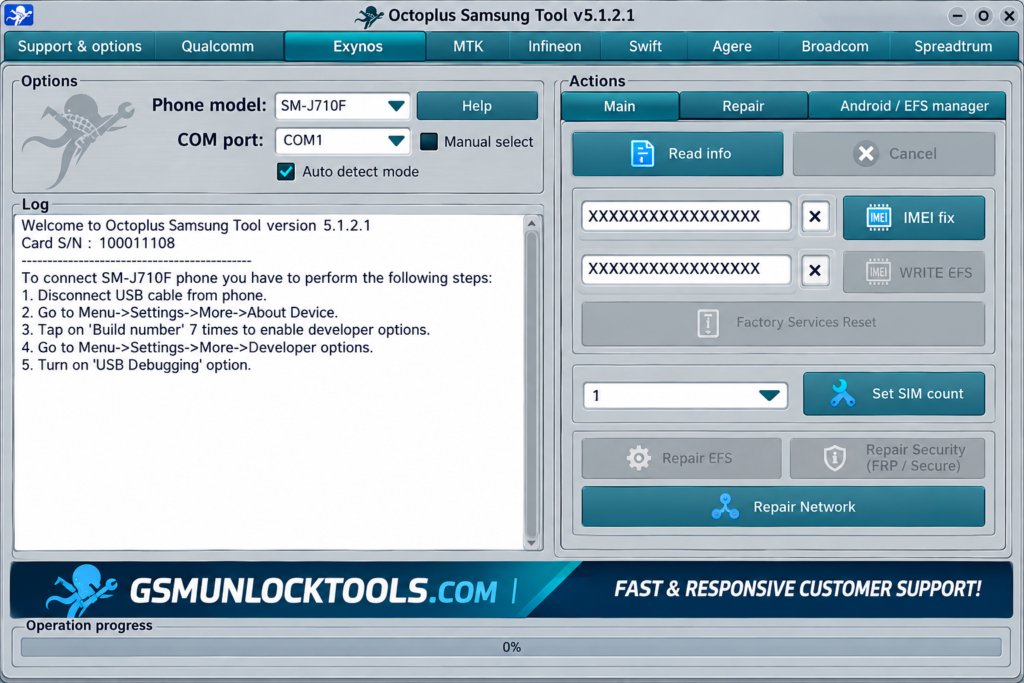
Octoplus Samsung Tool is a dedicated Samsung device servicing and flashing tool for Windows. It provides supported operations such as stock firmware flashing, FRP servicing, screen-lock reset, EFS/MDM functions, and network-lock servicing through a single interface.
Key Features of Octoplus Samsung Tool
Firmware Flashing
Flash stock firmware on supported Samsung devices. Helps restore or update compatible Samsung software.
FRP Servicing
Provides FRP-related servicing for compatible Samsung models. Supports selected devices and software versions.
Screen Lock Support
Supports screen and pattern-lock servicing on selected devices. Useful for supported lock-related servicing tasks.
EFS & NVM Repair
Provides repair functions for supported EFS, NVM, and EEPROM operations. Helps technicians handle data and repair tasks on compatible devices.
Network Servicing
Supports network code and lock-related operations on compatible models. Features vary according to the supported Samsung device.
EDL Support
Includes Qualcomm EDL servicing for selected Samsung devices. Supports specific Qualcomm-based models and loaders.
What’s New in Octoplus Samsung Tool?
- New Samsung Model Support
- Updated Qualcomm EDL Loaders
- Improved FRP Servicing
- Enhanced Firmware Flashing
- Updated Exynos & MediaTek Support
- Improved Device Detection
- Faster Servicing Operations
- Bug Fixes & Stability Improvements
System Requirements
| Requirement | Details |
| OS | Windows 7, 8, 10 & 11 |
| Processor | Intel/AMD processor |
| RAM | 2 GB or more |
| USB Port | Required for Samsung device connection |
| Drivers | Samsung USB drivers |
| Activation | Compatible Octoplus activation/box or dongle |
How to Download & Install the Octoplus Samsung Tool?
- Download the Octoplus Samsung Tool from a trusted source.
- Click on the download link.
- Wait until the download is complete.
- Extract all files to your Desktop.
- Open the extracted folder.
- Enable USB debugging when using ADB functions.
- Open the tool that is downloaded.
- Run the tool as an administrator.
- The tool will open on your PC screen.
- Enjoy using the tool.

Pros & Cons
| Pros | Cons |
| Supports many Samsung models | Full functionality may require activation |
| Firmware flashing support | Features vary by device and chipset |
| Supports Qualcomm, Exynos & MTK | Some operations require specific loaders |
| Regular software updates | Not every feature works on every model |
| Includes multiple repair functions | Compatible drivers may be required |
Also check: DRT Device Reset Tools Oppo V2026 Free Download for Pattern & FRP
Conclusion
Octoplus Samsung Tool is a Windows-based servicing tool. It supports Samsung devices, offering firmware flashing, FRP and screen-lock servicing, EFS/NVM repair, IMEI-related functions, network servicing, and selected EDL operations. Its available features depend on the device model, chipset, software version, and tool release.
FAQ’s
Can Octoplus perform network servicing?
Yes, network-related servicing and code functions are available for compatible models.
Is Octoplus Samsung Tool free?
The official product uses activation/licensing, and available functionality depends on the applicable Octoplus setup.
Are Samsung USB drivers required?
Compatible Samsung USB drivers may be required for proper device detection and communication.
Does it support older Samsung devices?
Yes, legacy Octoplus Samsung software continues to provide support for older compatible models.
Does every feature work on every Samsung phone?
No. Available functions depend on the model, chipset, Android/software version, security level, loaders, and tool release.