BFT Tool v1.8 Download Latest Version 2026 (100% Working)
Are you facing these while repairing a phone? FRP locks, screen locks, bootloops, logo-stuck errors, firmware corruption, and IMEI issues. These issues may prevent the Android device from functioning properly or impact the repair process. BFT Tool v1.8 helps to prevent these problems with a single Windows application that supports MTK, Qualcomm, and SPD devices from Samsung, Xiaomi, Redmi, POCO, Oppo, Vivo, Realme, Huawei, Motorola, Infinix, Tecno, and Nokia. It allows you to flash firmware, remove FRP, repair IMEI, perform factory resets, and easily read device information.
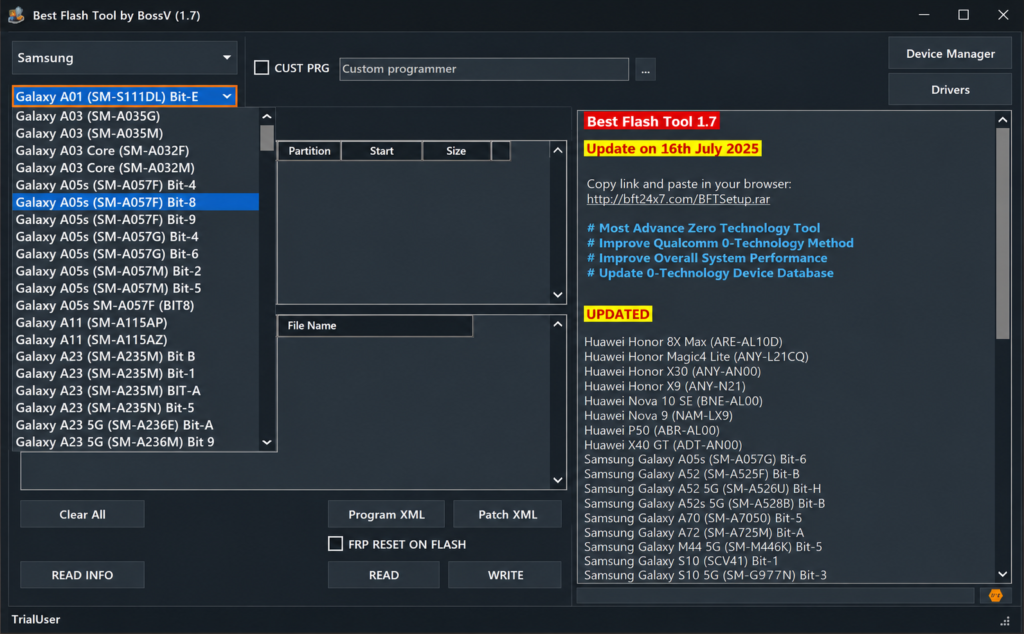
What is the BFT Tool?
The BFT Tool (Best Flash Tool) is a free Android service application developed by BossV Miracle Team for MediaTek (MTK), Qualcomm, and SPD (Unisoc) devices. It’s an important tool used by mobile repair technicians to resolve software-related issues, such as FRP lock, screen lock, boot loop, firmware flashing, IMEI repair, factory reset, bootloader unlock, and MDM removal. With vast compatibility across various brands like Samsung, Xiaomi, Redmi, POCO, Oppo, Vivo, Realme, Huawei, Motorola, Infinix, Tecno, and Nokia. BFT Tool makes the process fast, easy, and reliable
Why Choose BFT Tool
BFT Tool is trusted and recommended by mobile repair technicians because of its stable performance, wide device compatibility, and regular updates from the BossV Miracle Team. It supports MTK, Qualcomm, and SPD devices. With this tool, you can solve issues including firmware flashing, FRP removal, screen lock removal, bootloader unlock, IMEI repair, and factory reset. The BFT tool supports a fast, reliable Android servicing experience thruogh lighweight easy to use interface.
Key Features of the BFT Tool
The latest Update of the BFT Tool V1.8 comes with several new features and some bug fixes that help you to use it easily.
Flash firmware
- BROM exploit with scatter firmware file to flash MTK.
- Qualcomm & SPD multi-mode flashing.
- Flash Qualcomm firmware using firehose loaders & XML and a Patch XML file.
- Qualcomm FRP reset during flashing
- Read/Write Qualcomm firmware
- UniSOC SPD Flash PAC and CFG files
- SPD Write PAC files
Screen lock & FRP removal
- Remove FRP Lock, Bypass Google Factory Reset Protection (FRP).
- Unlock Screen Lock, Remove PIN, password, pattern, or fingerprint locks.
- Multiple Unlock Modes, Supports ADB, Meta, and Diag methods for different chipsets and device states.
- Wide Device Compatibility – Works with supported MTK, Qualcomm, and SPD smartphones from major Android brands.
MTK Meta Mode
- Read info
- Format EMMC and UFS
- Read/Write NVM
- factory reset
Infinix, iTel, Tecno ADB-only mode
- Enable/Disable ADB
- Reset FRP (Google account lock)
- Lock/Unlock device
- Enable features via ADB
IMEI repair
- Repair IMEI, restore or repair IMEI on supported Android devices.
- Multi-Chipset Support, Compatible with MTK and Qualcomm-powered smartphones.
- Popular Brand Compatibility: Supports selected models from Vivo, Oppo, Xiaomi, Redmi, and other supported brands.
- Read & Verify IMEI, Read current IMEI information, and verify changes after the repair process.
Factory reset & safe format options
One-Click Factory Reset: Restore supported Android devices to factory settings in a few steps.
Safe Device Formatting: Format user data safely to resolve common software issues.
Supports Multiple Chipsets, compatible with supported MTK, Qualcomm, and SPD devices.
Mi Account and MDM reset
- Mi Account Reset: Reset Mi Account on supported Xiaomi devices where the tool supports the operation.
- Remove or reset the Huawei ID on compatible Huawei models.
- Dedicated reset functions for selected models with supported security methods and chipsets.
backup and restore
- Create a backup of the Replay Protected Memory Block (RPMB) before servicing supported devices.
- Restore previously backed-up RPMB data when supported by the device and chipset.
- Helps preserve important security-related data during advanced repair procedures.
Supported Brands & Models
Here you can gain knowledge about all supported brands and models with the BFT Tool. Including Infinix, itel, Samsung, Motorola, Nokia, Tecno, Zte, and other MTK, Qualcomm & SPD-powered Android phones.
System Requirements For BFT Best Flash Tool
To run BFT Best Flash Tool smoothly on your PC, make sure your system meets the following requirements:
| System Component | Requirement |
|---|---|
| Operating System | Windows 7, 8, 10, or 11 (32-bit & 64-bit) |
| Processor | Intel or AMD Dual-Core Processor (or higher) |
| RAM | Minimum 4 GB RAM (8 GB Recommended) |
| Storage Space | At least 500 MB of Free Disk Space |
| USB Drivers | Android USB Drivers and MTK/Qualcomm Drivers Installed |
| Additional Requirements | Disable Antivirus Temporarily Before Running the Tool to Prevent False Detections |
How to Use Best Flash Tool V1.8
Download & extract the BFT tool V1.8 to your Computer.
Run the SetupTool.exe as Administrator.
Next, the installer wizard will open.
Click Next, agree to the terms, and complete the installation.
Then run the tool.
Run the tool with Admin & wait for a few seconds to open it.
The login window will open with auto-filled credentials.
Click Login.
In case it is blank, then use the above login credentials.
Next, select the function you want to use.
After that, check the log screen instructions & connect the phone according to it.
Don’t forget to install the USB driver before proceeding.
Now the tool will fix & restart the phone.
That’s it.
Also Check: Dolphin Tool V1.2 Download Latest Version for Windows (2026)
Fix BestFlashTool.exe – System Error
- If you see after installation, “code execution cannot proceed because MSCCP100.dll was not found”.Then, follow the instructions to fix the issue easily.
- First, download the following 2 Files on your computer & extract them.
- Msvcr100.dll
- Msvcp100.dll
- Next, copy & paste the above files into the BFT installation directory.
- After that, Install the Microsoft Visual C++ All-In-One
- Run BestFlashTool.exe.
- Now the tool will load & fix the error.
Risks of Using the Best Flash Tool
- Warranty Void
- Legal Risks
- Device Dead/Brick
Conclusion
The BFT Tool is the best choice if you are a mobile repair technician. It helps you to prevent common problems that you usually face in daily life. With this small tool, you can fix FRP locks, screen locks, bootloops, logo-stuck errors, firmware corruption, and IMEI issues.
FAQs
Is the BFT TOOl is free to use?
Yes, BFT Best Flash Tool is 100% free to use with no activation required.
Which mobile devices are supported?
It supports Oppo, Vivo, Xiaomi, Infinix, Tecno, Realme, Samsung, Huawei, Motorola, Nokia, and many other Android models.
Can BFT remove FRP and Screen lock?
Yes, it can remove FRP, bypass screen locks, and unlock bootloaders on supported devices.
Does it support IMEI repair?
Yes, BFT includes IMEI repair functions for MTK, Qualcomm, Vivo, Oppo, and Xiaomi devices.
Is BFT Tools safe to use?
Yes, it is safe if used properly. Always download from trusted sources and disable antivirus software to avoid false detection.