TF AIO Tool V1 Free Setup Download by Techno Fayez
Phone servicing can become difficult when different devices need different tools. TF AIO Tool brings common Android services into one Windows program, supporting ADB, Fastboot, MTP, MTK, Huawei, Honor, Pixel devices, etc. It helps technicians handle FRP, reset, flashing, backup, and other supported repair tasks from one place.
What is the TF AIO Tool?
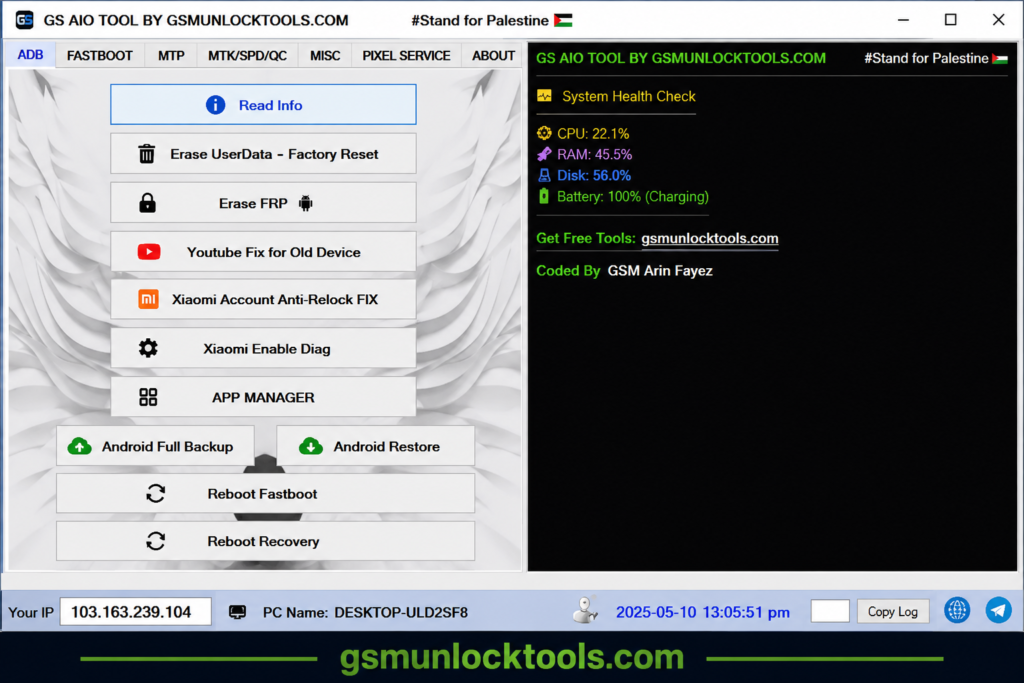
TF AIO Tool is a Windows tool for Android phone servicing. It supports ADB, Fastboot, and MTP, and supports MTK, SPD, and Qualcomm devices. It can also show phone info, factory reset, FRP service, and handle other basic repair work. Its simple design helps users manage Android phones from a PC without using other tools.
Key Features Of TF AIO Tool
ADB Functions
TF AIO Tool supports ADB mode for reading device info, wiping user data, and performing factory resets on Android phones.
Fastboot Functions
TF AIO Tool supports Fastboot mode to check device info and perform supported FRP and factory reset tasks on compatible Android phones.
Huawei & Honor Support
TF AIO V1 supports Huawei and Honor devices with options to read device info, copy SN, enter Honor FRP keys, and run supported unlock operations.
Samsung MTP Service
TF AIO Android Tool supports Samsung MTP services, including reading device info, enabling ADB, performing a factory reset, and rebooting to Download/Odin Mode on supported devices.
MTK Support
TF AIO utility provides MTK options for device connection, CPU check, handshake, factory reset, FRP erase, DA upload, full dump, and dump writing on supported MediaTek devices.
Pixel Services
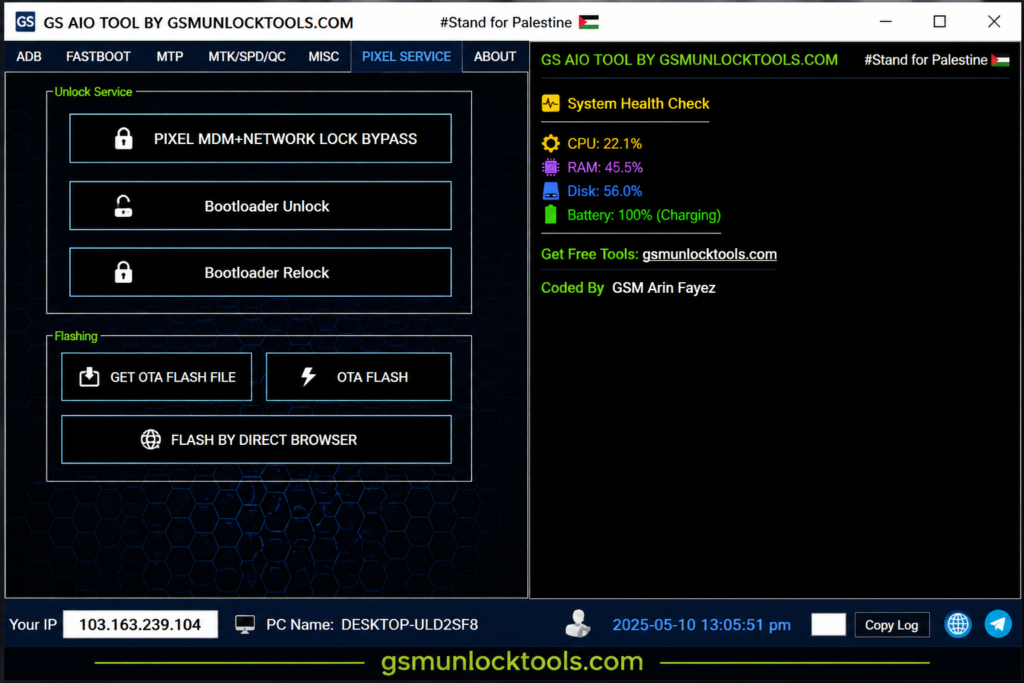
TF AIO V1 offers supported Pixel options for bootloader unlock, bootloader relock, and network or MDM lock service.
OTA & Flashing
The TF AIO Android Tool supports OTA file downloads, OTA flashing, and direct browser-based flashing for supported devices.
PC Utilities
TF AIO includes basic PC tools for driver signature control, hiding active windows, desktop refresh, PC health checks, and disk cleanup.
CPU Detection
The tool can check the CPU of a connected Android phone to help identify its chipset.
What’s New in the TF AIO Tool?
- Android Backup & Restore
- SPD/Unisoc Servicing
- Qualcomm Loader Support
- Samsung Model-Specific Services
- Multiple Reboot Options
- Device Information Reading
- Firmware Management
- MTP Device Detection
- Bootloader Services
Pros & Cons
| Pros | Cons |
| All-in-one Android servicing | Support varies by device/version |
| ADB & Fastboot support | Some features work on selected models |
| MTK, SPD & Qualcomm support | Wrong files may cause software issues |
| Samsung MTP services | Reset/erase may delete data |
| Huawei, Honor & Pixel support | Proper drivers/modes may be required |
| OTA flashing & backup/restore | New security updates may limit features |
| Simple Windows interface | — |
Download Information
| File Detail | Information |
| Tool Name | TF AIO Tool |
| Version | V1 |
| Developer | Techno Fayez |
| File Type | ZIP / RAR package |
| Platform | Windows |
| Tool Type | Android Servicing Tool |
| Main Support | ADB, Fastboot, MTP, MTK, SPD, Qualcomm |
How to Download TF AIO Tool v1?
- Download: Get the TF AIO Tool package from a trusted source.
- Extract: Extract the downloaded ZIP or RAR file.
- Install Drivers: Install the required USB and device drivers.
- Open Tool: Run the TF AIO executable on Windows.
- Connect Phone: Connect your Android phone with a USB cable.
- Check Device: Read the phone information and CPU.
- Select Mode: Choose ADB, Fastboot, MTP, MTK, SPD, or Qualcomm.
- Choose Function: Select the required service.
- Check Details: Confirm the device model and firmware.
- Start Process: Run the operation and keep the phone connected.
System requirements
| Requirement | Details |
| Operating System | Windows PC |
| Processor | Intel/AMD processor |
| RAM | 2 GB or more |
| Storage | 500 MB+ free space |
| USB Port | Required |
| USB Cable | Good-quality data cable |
| Drivers | ADB, Fastboot, and chipset drivers |
| Internet | Needed for some online functions |
| Admin Rights | Recommended |
| Android Device | Supported Android phone |
Also check: GS Tool v2023.02.03 Download Free for Android [2026]
Conclusion
TF AIO Tool is a useful Android servicing tool for technicians working with MTK, Qualcomm, SPD/Unisoc, Samsung, Huawei, Honor, and Pixel devices. It brings ADB, Fastboot, MTP, FRP, flashing, factory reset, and bootloader options into one Windows program. Its simple interface makes common phone-servicing tasks easier, though device and firmware support may vary by model.
FAQ’s
Does TF AIO Tool support Xiaomi devices?
Yes, TF AIO V1 includes Xiaomi services such as Anti-Relock Fix and Enable Diag for supported models.
Can TF AIO Tool back up Android phones?
Yes, TF AIO provides Android Full Backup and Restore options through ADB.
Does the TF AIO Tool have an App Manager?
Yes, the tool includes an App Manager for supported Android devices.
Can the TF AIO Tool reboot Android into Recovery?
Yes, its ADB section includes options to reboot supported phones into Fastboot or Recovery mode.
Can the TF AIO Tool identify a phone CPU?
Yes, the Phone Misc option can check the CPU or chipset of a connected Android phone.
Does TF AIO Tool support Pixel bootloader relock?
Yes, TF AIO V1 includes Pixel bootloader unlock and relock options for supported devices.

![Xiaomi Tool V2026.01.18 Free Download Latest Version [2026]](https://gsmunlocktools.com/wp-content/uploads/2026/09/xiaomi-tool-v2026-01-18-768x576.png)