TFT Tool V7 Download Latest Version for Windows – Fast & Secure
Facing FRP lock, screen lock, bootloop, flashing error, and other software problems in your Android phone?
Try using the TFT Tool, as it is one of the best solutions for your Android servicing needs. It allows you to flash firmware, bypass FRP lock, perform a factory reset, manage the bootloader, and recover the device. The application supports devices from Samsung, Xiaomi, Redmi, POCO, Vivo, Oppo, Realme, Huawei, Tecno, Infinix, Itel, and many other brands, including those with MTK, QCOM, and SPD processors.
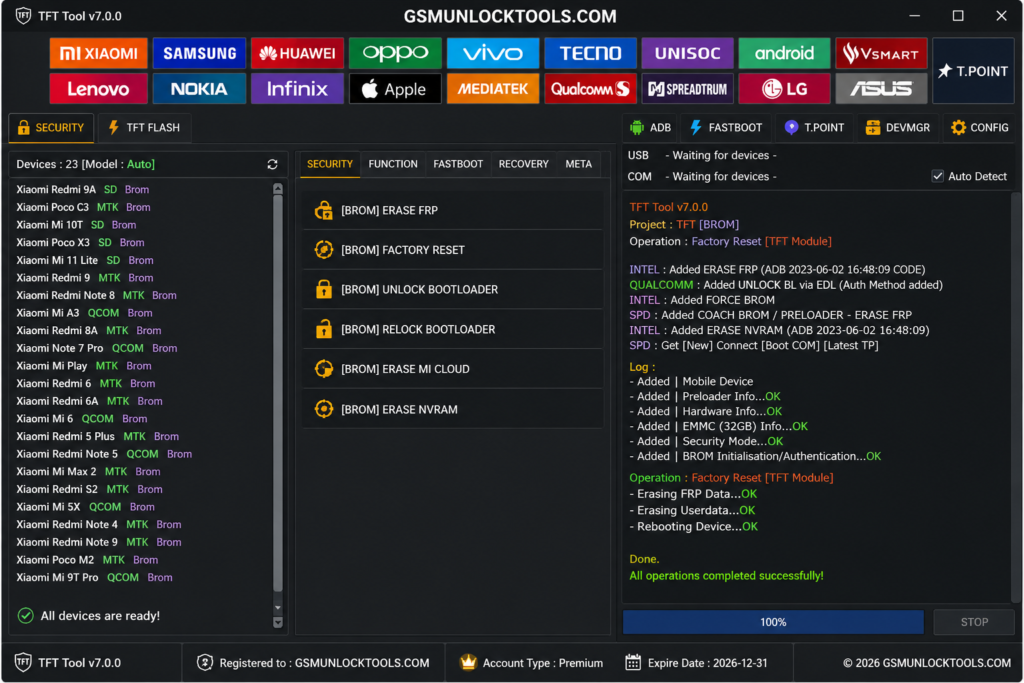
What is the TFT Tool?
TFT Tool is one of the best servicing software that works for Android to perform tasks such as FRP Bypassing, Firmware flashing, Factory Reset, Unlock Screen, IMEI-related tasks (compatible devices), and Device Maintenance. The software is compatible with popular brand phones, including Samsung, Xiaomi, Redmi, POCO, Vivo, Oppo, Realme, Huawei, Tecno, Infinix, Itel, Motorola, Nokia, and others. The TFT Tool is compatible with chipset manufacturers such as MTK, Qualcomm, SPD, and others. The software operates smoothly on both Windows 10 and Windows 11.
Key Features of the TFT Tool
FRP Bypass
Unlock Google FRP (Factory Reset Protection) on Samsung, Xiaomi, Redmi, POCO, Vivo, Oppo, Realme, Tecno, Infinix, Itel, Huawei, and other Android smartphones fast and secure.
Firmware Flashing
Flash the original firmware, OTA updates, and ROMs to recover from bootloops, crashes, system issues, logo stuck problems, and update issues while ensuring smooth performance of the phone.
Screen Lock Bypass
Bypass and remove PIN, pattern, screen, fingerprint, and password lock on supported Android phones without following complex steps.
Factory Reset
Safe factory reset of your phone for erasing data, fixing software issues, unlocking screen lock, and resetting to default settings.
ADB & Fastboot
Access advanced ADB, Fastboot, Recovery, EDL, and BROM mode features to reset your device, unlock the bootloader, flash partitions, and perform system maintenance.
Broad Brand & Chipset Compatibility
Compatible with a wide range of brands such as Samsung, Xiaomi, Redmi, POCO, Vivo, Oppo, Realme, Huawei, Motorola, Nokia, Tecno, Infinix, Itel, OnePlus, and devices using MTK, QCOM, SPD, Exynos, and Kirin chipsets.
Device Auto-Detection
Detects compatible Android devices automatically and sets up the required connection to save time and increase accuracy in the repair process.
Backup & Restore
Create a backup of essential partitions and the available device data before flashing or repairing in order to restore when necessary.
EDL Mode Support
TFT Tool is an EDL (Emergency Download Mode) supported tool that facilitates recovery in case of a malfunctioning device that won’t boot. It can be used to flash firmware, unbrick, and do any kind of partitioning on Qualcomm-supported phones.
Download Mode Support
TFT Tool’s Download Mode function allows for secure installation of firmware, restoration of software, and recovery of your system. It also helps you solve problems related to boot loops, stuck logos, corrupted software, and update failures while providing smooth communication between your phone and computer.
Easy-to-Use Interface
Equipped with an easy-to-use user interface that will make performing advanced Android services, flashing, and unlocking effortless.
Windows Compatible
Runs perfectly well on Windows 7, Windows 8, Windows 10, and Windows 11 (64-bit) with a reliable USB connection and excellent performance in the service of Android devices.
Supported Mobile Brands
The TFT Tool can be used to flash, perform FRP unlock, wipe screen locks, fix firmware issues, perform a factory reset, and more on almost all of the popular mobile phone brands running on Android OS. Some of the most common phone brands that can be serviced using the TFT Tool include,
- Samsung
- Xiaomi
- Redmi
- POCO
- Vivo
- Oppo
- Realme
- Huawei
- Honor
- Motorola
- Nokia
- OnePlus
- Infinix
- Tecno
- Itel
- Lenovo
- Asus
- Sony
- ZTE
- Google Pixel
Supported Chipsets
The TFT Tool is compatible with some of the most popular MediaTek (MTK), Qualcomm (QCOM), Unisoc (SPD), Exynos, and HiSilicon Kirin chipsets that are available in modern-day Android smartphones. The extensive support of chipsets makes it possible to carry out complex tasks like firmware flashing, partition handling, boot repairing, FRP unlocking, and software repairing on supported devices.
Supported Android Versions
The TFT Tool works perfectly well with many different versions of Android. It can be used with many Android OS devices that have Android 5.0 (Lollipop) and above, up to the current versions of Android, depending on the make of the phone, chipset, and security patch version of the phone.
System Requirements
| Requirement | Recommended Specification |
| Operating System | Windows 10 or Windows 11 (64-bit) |
| Processor | Intel Core i3/i5 or AMD Ryzen 3/5 |
| RAM | 4 GB minimum (8 GB or higher recommended) |
| Storage | 2–5 GB free disk space (SSD recommended) |
| USB Drivers | Latest Android USB Drivers for supported devices |
| Internet | Required for updates, activation, and selected online functions |
| Display Resolution | 1366 × 768 or higher |
| Connection | USB 2.0/3.0 port with a high-quality USB cable |
Minimum System Requirements
| Requirement | Minimum Specification |
| Operating System | Windows 7, 8, 10, or 11 (64-bit) |
| Processor | Intel Core i3 or AMD equivalent |
| RAM | 4 GB |
| Free Storage | 2 GB available disk space |
| Display | 1366 × 768 resolution |
| USB Drivers | Installed Android USB Drivers |
| Internet Connection | Required for activation and updates |
| USB Port | USB 2.0 or higher |
Check Device Compatibility
Before installing TFT Tool, make sure that your Android device, chipset, and version are compatible with the latest version of the application. It is helpful to have installed proper USB drivers and chosen the right module for your particular brand to avoid any problems in connecting and running the application.
What’s New in the Latest TFT Tool Version?
- Improved support for a wider range of Android devices.
- Enhanced FRP Bypass and Screen Lock removal functions.
- Faster firmware flashing and processing performance.
- Improved USB communication for stable device connectivity.
- Support for the latest Android security patches.
- Expanded compatibility with MediaTek (MTK), Qualcomm (QCOM), and Unisoc (SPD) devices.
- Added support for newly released Android smartphones.
- Various bug fixes for improved stability and reliability.
- Performance optimizations for faster and smoother operation.
- Minor interface improvements for a better user experience.
Main Functions of the TFT Tool
- FRP Bypass for devices running Android OS.
- Firmware Flashing to flash stock firmware on the device.
- Screen Lock Removal in case of PIN, Pattern, or Password.
- Factory Reset without complicated steps.
- Managing Bootloader, IMEI, and Device Information for certain devices.
- Backup & Restore to save important data from the device.
How to Download the TFT Tool
- Download the most recent version of the TFT Tool archive from a reliable website.
2. Open the extracted ZIP or RAR archive by using either WinRAR or 7-Zip.
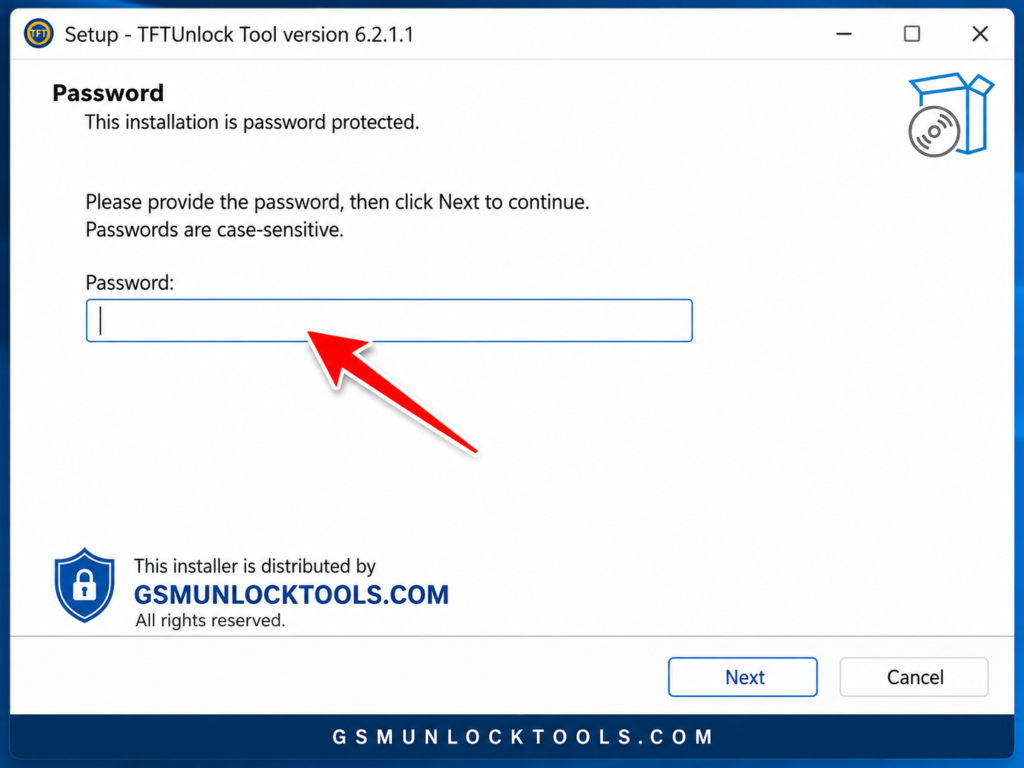
3. Install the setup file and complete the installation on your Windows computer.
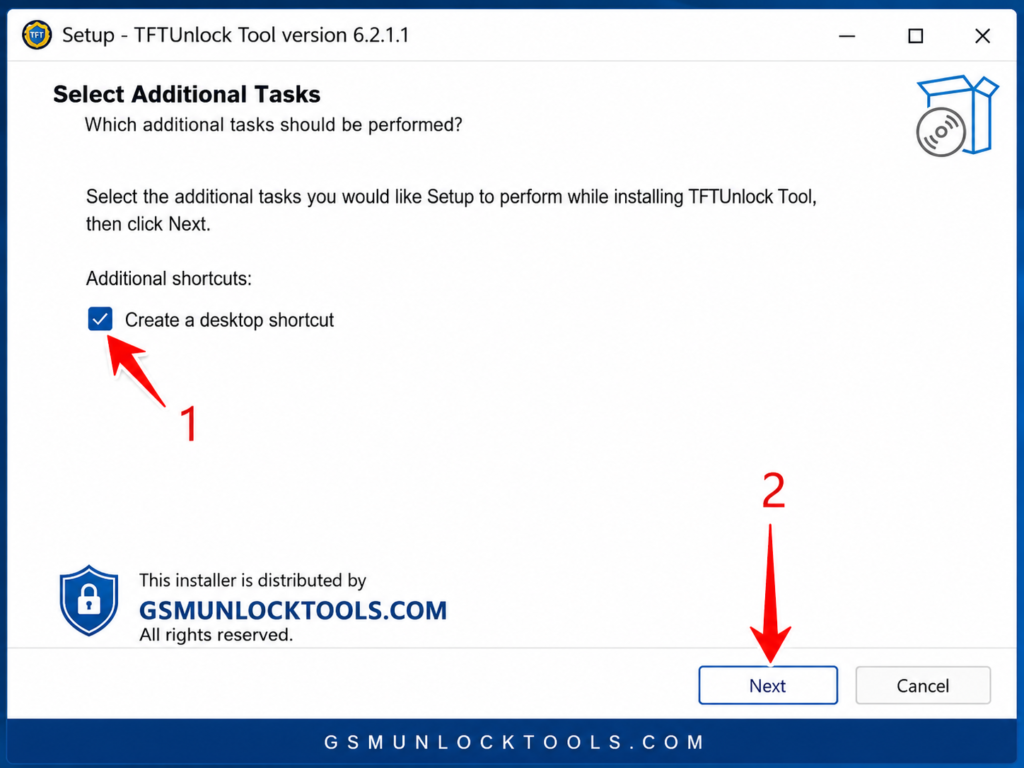
4. Install USB Drivers if necessary and reboot your computer.
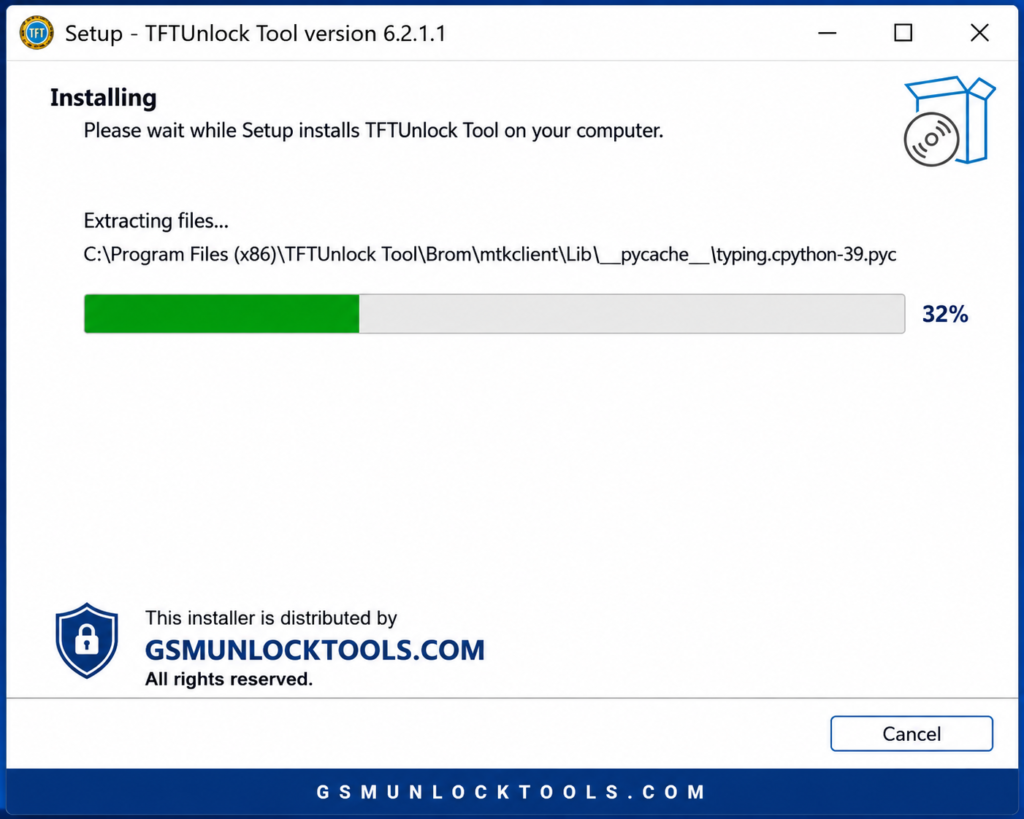
5. Open up the TFT Tool as an administrator, connect your Android phone, and start servicing your device.
How to Install the TFT Tool on Windows
- Use WinRAR or 7-Zip to extract the downloaded TFT Tool setup files.
- Double-click the Setup.exe file and proceed with the installation process as prompted.
- Make sure that you have installed the necessary Android USB Drivers and then restart your Windows PC.
- Launch the TFT Tool as an Administrator.
- Connect your compatible Android phone with the help of a USB cable.
How to Use the TFT Tool
- Open the TFT Tool as an Administrator on your Windows Computer.
- Connect your compatible Android phone with a suitable USB cable and USB Drivers if required.
- Choose your device’s brand, chipset, and the operation to perform, for example, FRP Unbrick, Flashing Firmware, Factory Reset, or Remove Screen Lock.
- Follow the on-screen instructions and keep your phone connected until the task is done successfully.
- Reboot your device upon completion of the task.
How to Update the TFT Tool
- Download the most recent TFT Tool software.
- Make sure that you close the current TFT Tool software before initiating the upgrade process.
- Install the new software or change the old program files if needed.
- Upgrade your necessary USB Drivers for compatibility with the new devices.
- Run the updated TFT Tool, check the version number, and use all the features of the newest version.
Common Errors and Troubleshooting
- Device Not Detected: Install the latest Android USB Drivers, verify the USB cable connection, and connect the device again.
- Flashing Error Occurred: Make sure the correct firmware file and device are selected before proceeding.
- USB Connectivity Problems: Change the USB port, set the necessary device mode, and launch the TFT Tool application again.
- Program Not Opening: Execute the program as an administrator, and make sure the Windows system is fully compliant with the program requirements.
- FRP/Unlocking Error: Check whether your device is compatible with the required Android version and FRP unlocking.
Pros and Cons of the TFT Tool
| Advantages (Pros) | Limitations (Cons) |
|---|---|
| Supports multiple Android brands, chipsets, and servicing tasks on a single platform. | Some features work only on supported devices, chipsets, and security patch levels. |
| Includes useful features like FRP Unlock, Firmware Flashing, Factory Reset, and Screen Lock Removal. | Requires the correct USB drivers and a stable USB connection for proper functionality. |
| Easy-to-use interface suitable for both beginners and professional mobile technicians. | Not compatible with every Android smartphone due to manufacturer restrictions and software updates. |
| Compatible with Windows OS and regularly updated to support newer devices and features. | Using incorrect firmware files or repair methods may result in flashing or software issues. |
TFT Tool vs Other Mobile Repair Tools
TFT Tool has several advantages over mobile phone repair tools in that it is capable of servicing devices from different Android manufacturers, using different chipsets, and has all the necessary functions on one platform. It is better balanced than other tools in terms of FRP unlocking, firmware flashing, and recovery capabilities.
| Feature | TFT Tool | Other Mobile Repair Tools |
| Device Support | Supports multiple Android brands and chipsets | Often focused on specific brands or models |
| FRP Unlock | Available for many supported devices | Support varies by tool and security level |
| Firmware Flashing | Supports firmware servicing on compatible models | May require separate tools for different brands |
| User Interface | Simple and beginner-friendly dashboard | Some tools require advanced technical knowledge |
| Chipset Support | Works with MediaTek, Qualcomm, and Unisoc devices | Limited chipset compatibility in some solutions |
| Updates | Receives improvements for newer devices | Update frequency depends on the developer |
Is the TFT Tool Safe to Use?
The TFT Tool is safe to use when you download it from a reliable source and when it is used properly. Make sure to check the tool’s version, always use official USB drivers, and observe servicing protocols to avoid software problems. Compatibility will depend on the device model, chipset, and its features.
Why Choose TFT Tool?
TFT Tool is popular among mobile technicians due to the fact that it offers an all-in-one solution for repairing and maintaining Android phones. This tool allows performing such operations as FRP unlocking, flashing the firmware, unlock screen, using ADB/Fastboot features, and chipset-level service. Its high compatibility with phones featuring MediaTek, Qualcomm, and Unisoc chipsets makes it convenient for smartphone repairs.
Conclusion
The TFT Tool is an efficient solution for servicing various Android devices. This application assists with performing operations such as FRP Unlock, firmware installation, screen unlocking, and recovery of the gadgets. Being compatible with many Android companies and different kinds of repairs, TFT Tool is a handy option for performing the repair work on mobiles.
FAQ’s
What are the uses of the TFT Tool?
TFT Tool is a tool for Android that allows you to perform FRP Unlock, firmware flashing, screen lock removal, factory reset, and device recovery operations on supported Android smartphones.
What kind of phones and chips are supported by TFT Tool?
TFT Tool supports several Android smartphone brands and popular chips, including MediaTek (MTK), Qualcomm (QCOM), and Unisoc (SPD) chips, depending on the phone model and version.
Does the TFT Tool unlock the FRP lock on Android phones?
Yes, TFT Tool has FRP Unlock capabilities that enable the removal of Factory Reset Protection (FRP) from supported Android devices. Compatibility varies depending on the brand, Android version, chips, and security patch level.
Is it possible to flash firmware with the TFT Tool?
Yes, the TFT Tool has support for compatible firmware flashing to fix issues such as boot loops, stuck logo errors, and software update failures on supported devices.
Is the TFT Tool available for Windows 10 and Windows 11?
Yes, TFT Tool for Windows runs on Windows 7, Windows 10, and Windows 11. It is advisable to install the right Android USB drivers for proper phone connection.
![MRT Tool V6.1.0 Free Download Setup for Windows Latest Version [2026]](https://gsmunlocktools.com/wp-content/uploads/2026/09/mrt-tool-v6-1-0-768x576.png)
![GSM RK Tool V1.1 Download Setup: 100% Working Solution [2026]](https://gsmunlocktools.com/wp-content/uploads/2026/08/gsm-rk-tool-v1-1-768x576.png)
![Easy Multi Tool v1.2.0: Download the Latest Version for Windows [2026]](https://gsmunlocktools.com/wp-content/uploads/2026/08/easy-multi-tool-v1-2-0-768x576.png)