KS Tool V4.6 Complete Mobile Repair Solution Free Download
Are you experiencing problems such as forgetting your screen lock, being stuck on Google’s FRP, or encountering a boot loop? These software problems can prevent your device from booting or functioning normally. KS Tool v4.6 helps repair supported Android devices by flashing firmware, removing FRP, resetting screen locks, and more. It supports Qualcomm (QCOM), MediaTek (MTK), Samsung, Xiaomi, OPPO, Vivo, Realme, etc devices through ADB, Fastboot, EDL, and Download Mode.
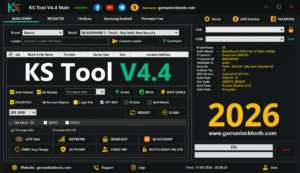
What Is The KS Tool V4.6?
KS Tool v4.6 is a Windows-based software that repairs software issues on Qualcomm (QCOM), MediaTek (MTK), Samsung Exynos, and HiSilicon devices. It helps to solve issues, including FRP removal, firmware flashing, screen lock reset, IMEI repair, bootloader operations, MDM unlock, and device diagnostics through ADB, Fastboot, EDL, META, and Download Mode. It supports various brands like Samsung, Xiaomi, Redmi, POCO, OPPO, Vivo, Realme, Huawei, etc. It is widely used by GSM technicians for fast and reliable Android servicing.
Features of the KS Tool v4.6
Firmware Flashing
This feature of KS Tool allows you to install or flash a stock ROM on supported Qualcomm (QCOM) and MediaTek (MTK) devices to fix boot loops, soft bricks, firmware corruption, stuck-on-logo issues, and failed software updates.
Screen Lock Removal
Your mobile is locked because of a forgotten password or multiple attempts; the KS tool helps to unlock your mobile phone without losing your personal data.
FRP Removal
Bypass Google Factory Reset Protection (FRP) after a factory reset on supported devices. KS Tool performs FRP reset through ADB, Fastboot, EDL, META, or Download Mode, depending on the device.
Bootloop Repair
The mobile screen is stuck on the logo and not working; this is due to a bootloop error. KS Tool helps to prevent bootloop errors in just a few steps.
Factory Reset & Data Formatting
Reset Android devices to factory settings or format userdata to resolve software errors, screen lock issues, and performance problems on supported models. You can wipe all data with the help of the KS tool.
ADB & Fastboot
The tool uses USB drivers to solve software problems; the drivers include ADB and fastboot, and some others.
Multi-Brand Support
The tool is Compatible with popular Android brands, including Samsung, Xiaomi, Redmi, POCO, OPPO, Vivo, Realme, Huawei, Motorola, Nokia, Tecno, and Infinix, with support varying by chipset and model.
Device Diagnostics
Read device information, including model, chipset, Android version, build number, serial number, and security patch level, provided by the KS tool before performing repair operations.
User-Friendly Interface
KS Tool has a clean dashboard with organized functions, making it suitable for both GSM technicians and advanced Android users who need quick access to servicing options.
Common Errors and Solutions
| Error / Issue | Solution |
| KS Tool does not detect the device | Reinstall the required USB drivers or connect the device through a different USB port. |
| Qualcomm device connection issues | Use the correct EDL (9008) loader before performing operations. |
| The MediaTek (MTK) device is not connecting | Enter BROM Mode or apply Secure Boot Bypass if required. |
| Samsung FRP process fails | Switch between ADB Mode and COM Mode, then try again. |
| Partition or flashing errors | Verify that the installed stock firmware is compatible with the device model. |
| KS Tool crashes unexpectedly | Restart the KS Tool and reconnect the device before retrying. |
How to Download KS Tool v4.6?
- Download the latest KS Tool package from a trusted source.
- Extract the ZIP or RAR file using WinRAR or 7-Zip.
- Install the required Android USB Drivers, including Qualcomm or MediaTek drivers if needed.
- Run the setup file with Administrator privileges and complete the installation.
- Restart your PC to apply the driver changes.
- Launch the KS Tool and connect your device in ADB, Fastboot, EDL, BROM, or Download Mode, depending on the required operation.
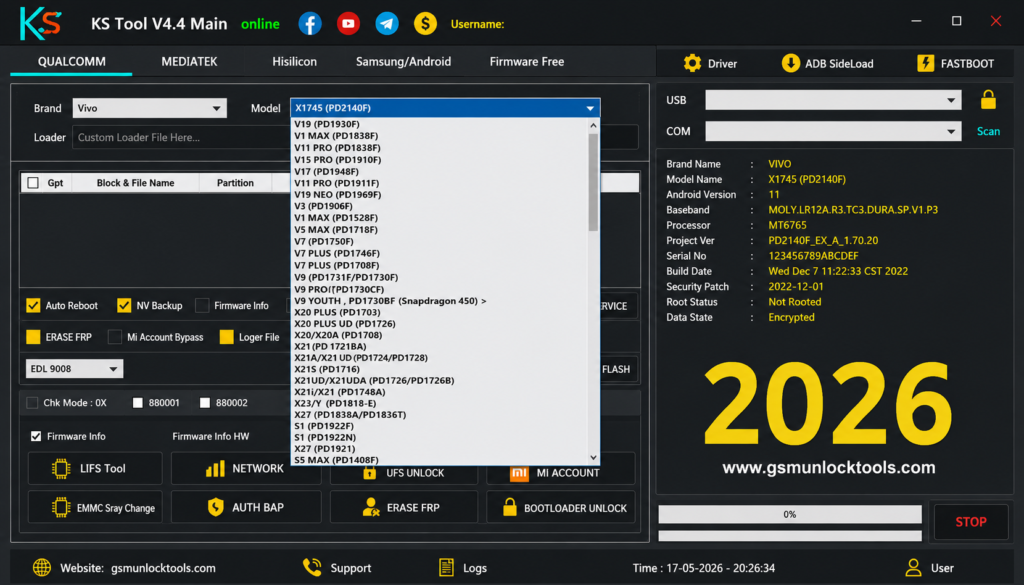
File Details of KS Tool v4.6
| Download Information | Details |
| Software Name | KS Tool |
| Latest Version | v4.6 |
| Category | Android Flashing & Repair Tool |
| Platform | Windows |
| License | Free |
| File Size | 199.71 MB |
| Supported Devices | Android Smartphones & Tablets |
| Supported Chipsets | Qualcomm (QCOM), MediaTek (MTK) |
| File Password | None |
Also Check: Titan Tool v7.0.0 Download Latest Version 2026 (100% Working)
System Requirements for KS Tool v4.6
| Component | Requirement |
| Operating System | Windows 7, Windows 8, Windows 10, Windows 11 (32-bit & 64-bit) |
| Processor | Intel Dual-Core or AMD Dual-Core (or higher) |
| Memory (RAM) | 4 GB Minimum (8 GB Recommended) |
| Storage | At least 1 GB of free disk space |
| Required Drivers | Android USB Driver, Qualcomm USB Driver, MediaTek USB VCOM Driver (as required) |
Conclusion
KS Tool is a Windows-based Android flashing and servicing tool that combines FRP removal, firmware flashing, screen lock reset, IMEI repair, bootloader operations, and MDM management in one application. With support for Qualcomm (QCOM), MediaTek (MTK), Samsung, Xiaomi, OPPO, Vivo, Realme, Motorola, Huawei, Tecno, and Infinix devices, it provides a practical solution for technicians and advanced Android users handling common software repair tasks.
FAQ’s
Does KS Tool support Qualcomm and MediaTek devices?
Yes. KS Tool supports Qualcomm (QCOM) and MediaTek (MTK) devices through compatible service modes such as EDL, Fastboot, and BROM, depending on the model.
Can KS Tool remove Google FRP?
Yes. KS Tool can bypass Google Factory Reset Protection (FRP) on many supported Android smartphones using the available FRP service methods.
Which Android brands are compatible with KS Tool?
KS Tool supports many Android brands, including Samsung, Xiaomi, Redmi, POCO, OPPO, Vivo, Realme, Huawei, Motorola, Nokia, Tecno, and Infinix.
Can KS Tool repair boot loop problems?
Yes. By flashing the correct stock firmware, KS Tool can help resolve boot loops, stuck-on-logo issues, and other software-related errors on supported devices.
Is KS Tool free to use?
Yes. KS Tool v4.6 is available as a free Windows utility for supported Android repair and servicing operations.
Who makes KS Tools?
KS TOOLS Werkzeuge Maschinen GmbH is a leading international supplier of tools and workshop equipment. Founded in 1992, the company is headquartered in Heusenstamm, Germany, and has over 350 employees with nine subsidiaries worldwide.
![Xiaomi Tool V2026.01.18 Free Download Latest Version [2026]](https://gsmunlocktools.com/wp-content/uploads/2026/09/xiaomi-tool-v2026-01-18-768x576.png)