
The Ghost Tool v3.0.0 Free Download Latest Version [2026]
If you are facing FRP locks, forgotten account verification, network restrictions, or software issues on your Android phone, The Ghost Tool is a Windows-based mobile servicing tool for compatible Samsung, Xiaomi, Vivo, Oppo, and other Android devices. It supports Qualcomm, MediaTek, and SPD/UniSOC chipsets, helping you troubleshoot common device issues from a single interface.
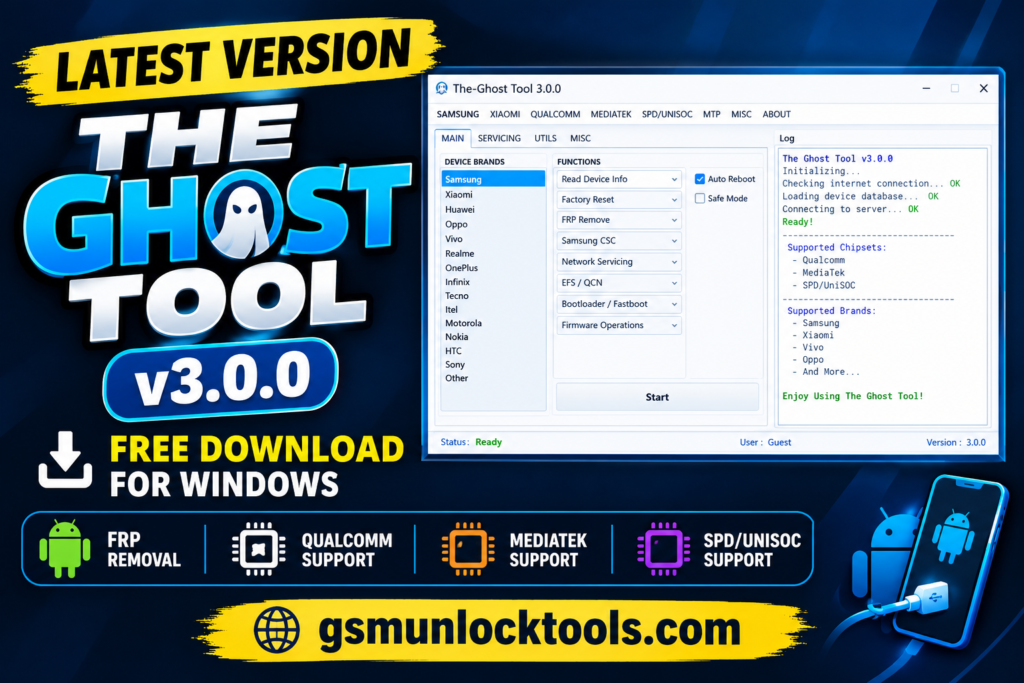
What is The Ghost Tool?
The Ghost Tool is a Windows-based mobile servicing utility designed to help users troubleshoot and manage supported Android smartphones and tablets. It supports devices powered by Qualcomm, MediaTek, and SPD/UniSOC chipsets, including selected Samsung, Xiaomi, Vivo, Oppo, and other compatible brands. The tool offers device information reading, factory reset, FRP troubleshooting, Samsung CSC management, network servicing, and selected firmware-related operations. Depending on the device and supported functions, it may also provide additional servicing options for compatible models.
Key Features of The Ghost Tool
Device Information Reading
The tool offers device information functions that can help technicians identify connected smartphones and tablets during supported servicing workflows.
Qualcomm Chipset Support
The Ghost Tool advertises servicing functions for selected Qualcomm-powered Android devices. Available operations depend on the model, firmware, and security restrictions.
Network Servicing
Selected versions advertise network-related servicing functions for compatible devices. Availability depends on the device model, carrier restrictions, and supported software configuration.
Xiaomi Device Servicing
The Ghost Tool and related Ghost Auth Tool releases advertise selected Xiaomi servicing functions, including certain Mi Account-related and Fastboot operations. Support should be verified for the specific device.
EFS and QCN-Related Functions
Some advertised servicing workflows include EFS backup or Qualcomm QCN-related operations. These functions are device-specific and require particular care because incorrect changes can affect network connectivity or device identity data.
What’s new in The Ghost Tool?
- Updated Android Device Servicing Functions
- Expanded Qualcomm Chipset Servicing Support
- MediaTek and SPD/UniSOC Device Support
- Enhanced FRP Troubleshooting Options
- Samsung CSC and Factory Reset Functions
- Additional Xiaomi Device Servicing Options
System Requirements
| Requirement | Specification |
| Operating System | Windows 7, 8, 10, or 11 |
| RAM | 4 GB recommended |
| Storage Space | 500 MB free space |
| USB Drivers | Compatible Android USB drivers |
| Internet Connection | Required for online login, if applicable |
How to Download & Install The Ghost Tool?
- Download the Ghost Tool from a trusted source.
- Click on the download link.
- Wait until the download is complete.
- Extract all files to your Desktop.
- Open the extracted folder.
- Enable USB debugging when using ADB functions.
- Open the downloaded tool.
- Run the tool as admin.
- The tool will open on your PC screen.
- Enjoy using the tool.
Pros & Cons
| Pros | Cons |
| Free Windows-based servicing utility | Requires compatible devices |
| Supports selected Qualcomm, MediaTek, and SPD chipsets | Some functions may require internet access |
| Offers FRP troubleshooting and factory reset options | Newer security patches may limit compatibility |
| Includes device information and Samsung CSC functions | Incorrect operations may cause data loss |
| Combines multiple mobile servicing features | Third-party downloads may pose security risks |
Also check: Amlogic USB Burning Tool V3.3.1 Free Download for Windows Latest Version [2026]
Conclusion
The Ghost Tool is a Windows-based mobile servicing utility advertised for compatible Android devices powered by Qualcomm, MediaTek, and SPD/UniSOC chipsets. Its listed features include device information reading, factory reset, FRP troubleshooting, Samsung CSC management, and selected Xiaomi servicing functions.
FAQ’s
Which chipsets does The Ghost Tool support?
The tool is for selected Qualcomm, MediaTek, and SPD/UniSOC-powered devices. Actual compatibility depends on the device and software version.
Does The Ghost Tool require an internet connection?
According to some descriptions, The Ghost Tool uses an online login process. An active internet connection may therefore be necessary to access its interface.
Can The Ghost Tool perform a factory reset?
The tool supports factory resets for selected devices. A reset may erase personal data, so back up important information whenever possible.
Why doesn’t The Ghost Tool detect my phone?
Possible causes include missing USB drivers, a faulty cable, an unsupported connection mode, or an incompatible device. Check the connection and confirm that the model is supported.
![IMEI Write Tool R3.0.0001 Free Download for Windows [2026]](https://gsmunlocktools.com/wp-content/uploads/2026/09/imei-write-tool-r3-0-0001-768x576.png)
One Comment