Avatar Auth Tool V1.0.5 Free Download Setup for PC Latest Version [2027]
When Xiaomi, Redmi, and Poco users face software problems such as firmware errors, boot issues, flashing difficulties, partition damage, and complicated device maintenance tasks, professional servicing becomes challenging. Avatar Auth Tool provides a Windows-based solution for supported Qualcomm and MediaTek devices, bringing firmware flashing, device information reading, EFS and partition management, factory reset operations, and ADB, Fastboot, EDL, Mi Assistant, and Recovery Mode servicing together in one tool.
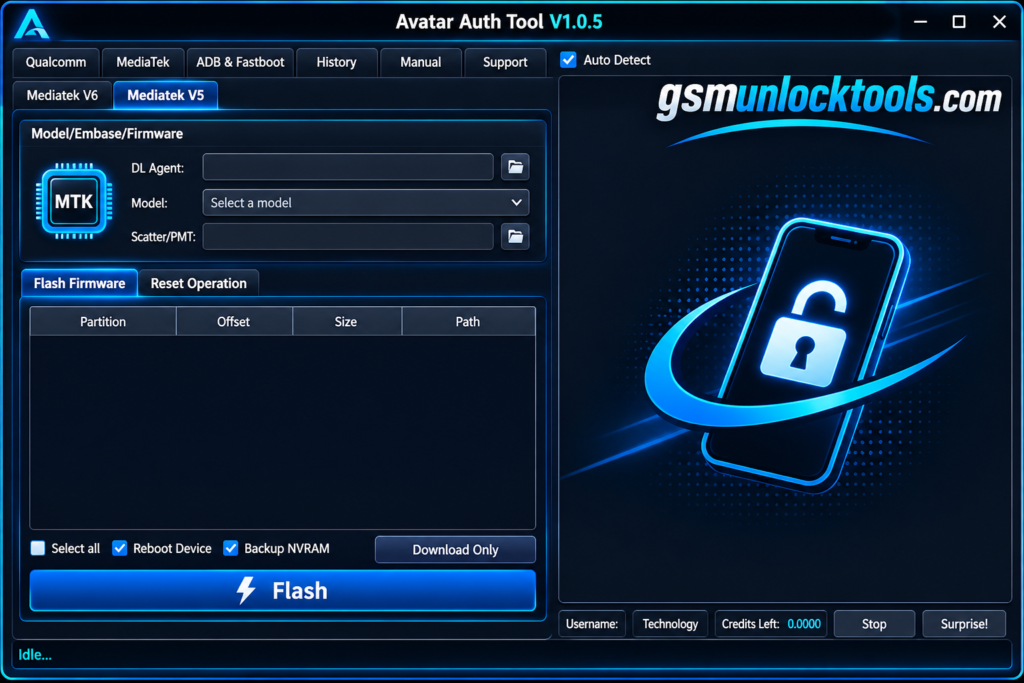
What is the Avatar Auth Tool?
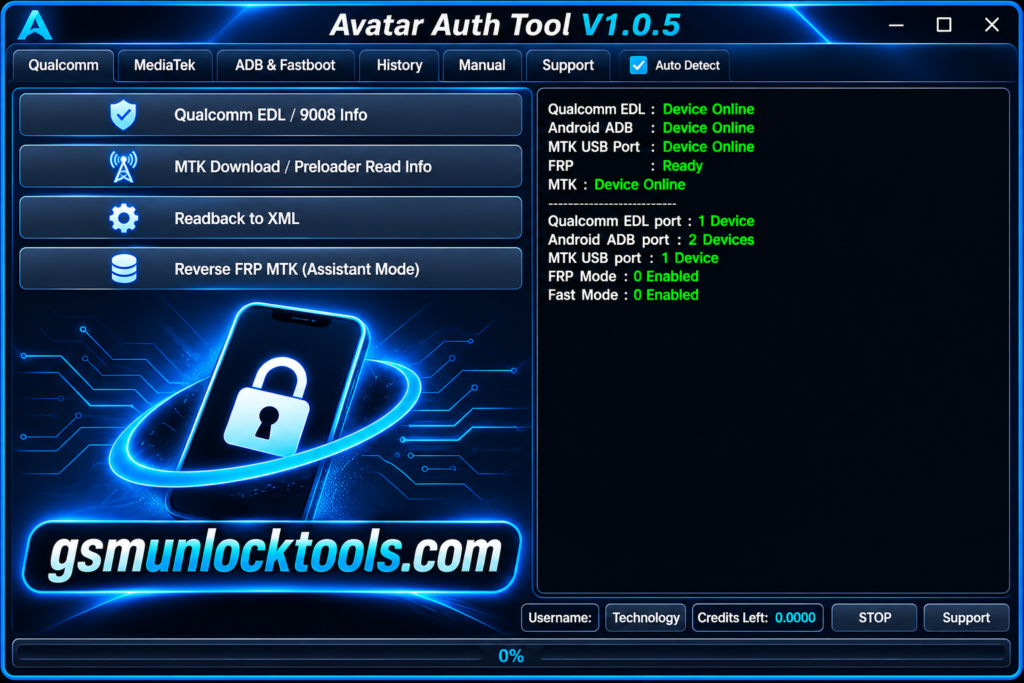
Avatar Auth Tool is a Windows-based mobile servicing utility designed primarily for supported Xiaomi, Redmi, and Poco devices powered by Qualcomm and MediaTek chipsets. It gives technicians tools for device diagnostics, firmware flashing, partition and EFS management, and servicing through modes such as ADB, Fastboot, EDL, and Recovery/Mi Assistant, simplifying common software maintenance and repair workflows.
Key Features of the Avatar Auth Tool
Firmware Flashing
The tool helps technicians flash compatible firmware files to supported Xiaomi devices. It helps resolve certain software errors and firmware-related issues.
Mi Account Servicing
The tool includes Mi Account-related servicing features for supported Xiaomi devices. Availability depends on device compatibility and authorized access.
Factory Reset
The tool provides factory reset operations for compatible devices. It helps restore supported smartphones to their default software settings.
Device Information Reading
The tool allows technicians to read available device information, including model and chipset details. It makes device identification and troubleshooting easier.
EFS Management
The tool includes EFS-related maintenance functions for supported devices. It helps technicians manage important device configuration data.
Partition Management
The tool supports selected partition maintenance operations on compatible smartphones. Useful for specific firmware and software repair workflows.
What’s New in the Avatar Auth Tool?
- Improved and Redesigned User Interface
- Advanced User Management System
- Expanded Qualcomm & MediaTek Device Compatibility
- Enhanced Manual Authentication Key Generation
- Improved Server-Based Firmware Flashing
- Advanced ADB, Fastboot & EDL Mode Support
- Enhanced Xiaomi Mi Assistant Mode Operations
- Improved Firmware & Partition Management
- Updated Device Information Reading Features
- Enhanced Mobile Servicing Capabilities
System Requirements
| Requirements | Minimum Specifications |
| Operating System | Windows 7, 8, 10, 11 |
| Processor | Intel or AMD Dual-Core |
| RAM | 4 GB Minimum |
| Storage | 500 MB Free Space |
| Architecture | 32-bit / 64-bit |
| USB Drivers | Qualcomm & MediaTek Drivers |
| Connectivity | USB Cable |
| Internet | Required for online features |
| Device Support | Compatible with Xiaomi, Redmi & Poco Devices |
How to Download & Install the Avatar Auth Tool?
- Download Avatar Auth Tool V1.0.5 Setup
- Extract the Downloaded ZIP Package
- Install the Required USB Drivers
- Launch Avatar Auth Tool on Windows
- Register or Log In to Your Account
- Connect Your Xiaomi, Redmi, or Poco Device
- Select Qualcomm or MediaTek Device Mode
- Read Device Information
- Choose the Required Servicing Function
- Complete the Authorized Servicing Process
Pros & Cons
| Pros | Cons |
| Supports Xiaomi, Redmi, and Poco devices. | Limited support for unsupported models. |
| Compatible with Qualcomm and MTK chipsets. | Requires a Windows PC. |
| Offers multiple servicing functions. | Some features may require credits or authentication. |
| Supports ADB, Fastboot, and EDL modes. | Requires proper USB drivers. |
| Includes firmware flashing capabilities. | Certain operations require technical knowledge. |
| Provides EFS and partition management. | Some functions depend on server availability. |
| Offers device information reading. | Requires a stable internet connection for online operations. |
| Combines several tools in one interface. | Not all features work with every device. |
Also check: A.N.TOOL v4.6 Free Download Setup Latest Version [2027]
Conclusion
Avatar Auth Tool is a useful Windows-based mobile servicing utility designed for supported Xiaomi, Redmi, and Poco smartphones powered by Qualcomm and MediaTek chipsets. Its features include firmware flashing, device information reading, EFS and partition management, and ADB, Fastboot, EDL, and Mi Assistant support. Always download software from trusted sources and verify its authenticity before installation.
FAQ’s
What are the main features of Avatar Auth Tool?
Its main features include firmware flashing, FRP-related servicing, device information reading, factory reset, EFS management, partition maintenance, and ADB, Fastboot, and EDL support.
Does Avatar Auth Tool require an internet connection?
Yes, an internet connection may be necessary for server-based flashing, authentication, and other online servicing functions.
Is Avatar Auth Tool free to use?
Some sources advertise free access, but certain functions may require credits, authentication, or an active server connection.
Can beginners use Avatar Auth Tool?
Yes, beginners can explore its basic functions, but advanced flashing and partition operations require technical knowledge and careful handling.
Is Avatar Auth Tool safe to install?
Its safety depends on the download source. Always scan the setup file, verify its digital signature, and avoid untrusted installers.