TFT MTK Module Tool v7.0.0 Free Download Setup Latest Version [2027]
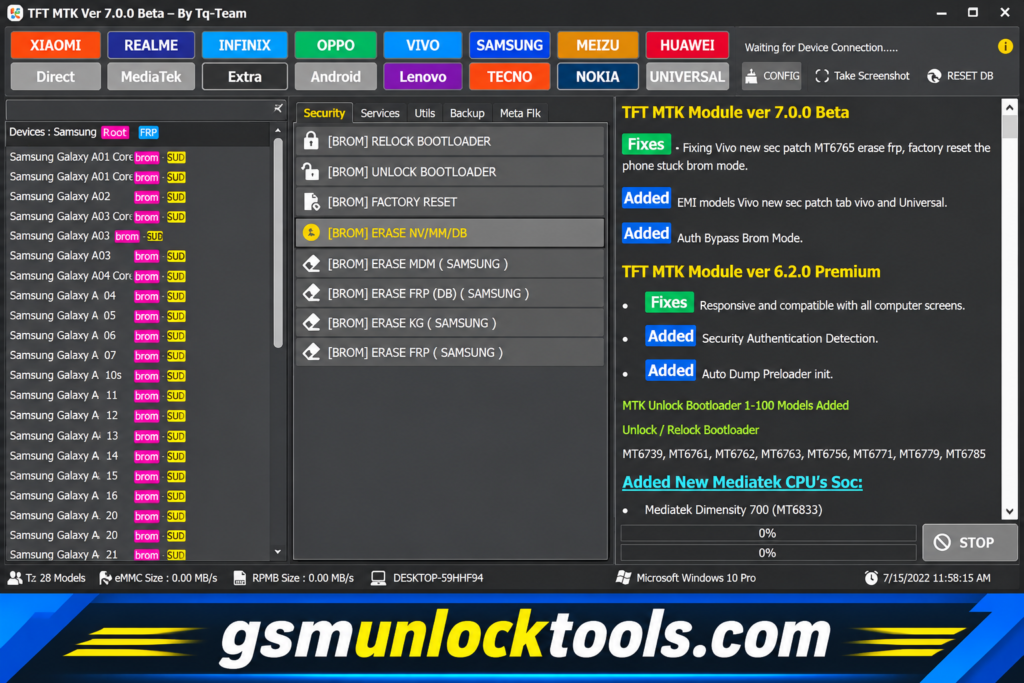
When your MediaTek Android devices have firmware issues, boot problems, or other software-related faults. TFT MTK Module Tool provides a servicing solution for supported smartphones and tablets, helping technicians perform tasks such as scatter firmware flashing, device diagnostics, and supported read/write and software maintenance operations through USB-based connections. With support that may include USB, MTP, and VCOM modes depending on the version and device, the tool simplifies identifying and repairing compatible MTK software issues in one centralized interface.
What is the TFT MTK Module Tool?
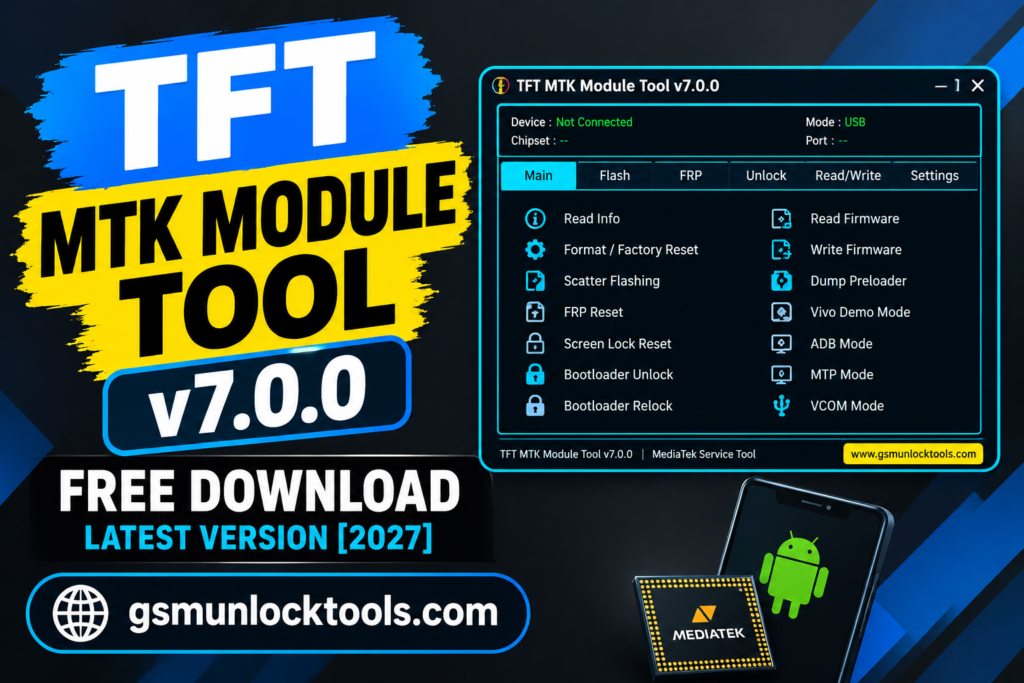
TFT MTK Module Tool is a mobile device servicing utility designed for supported MediaTek Android smartphones and tablets. It helps technicians perform firmware flashing, device diagnostics, software maintenance, and other supported servicing operations through compatible USB connections. Features and device compatibility can vary depending on the tool version and the specific MediaTek-powered device being serviced.
Key Features of the TFT MTK Module Tool
Scatter Firmware Flashing
The tool flashes scatter-based stock firmware on supported MediaTek devices to fix common software-related problems. This feature helps technicians restore compatible devices experiencing firmware corruption or boot issues.
FRP Servicing
The tool provides FRP-related servicing functions for supported MediaTek smartphones. It is authorized recovery and maintenance when legitimate access credentials are available.
Screen Lock Servicing
The tool includes supported screen-lock maintenance options for compatible MTK devices. These functions can assist technicians with authorized device recovery and software servicing.
Firmware Read & Write
The tool allows supported read and write operations for firmware-related data and device dumps. This can help technicians with firmware backups, diagnostics, and maintenance tasks.
USB, MTP & VCOM Support
The tool supports different connection modes, including USB, MTP, and MediaTek USB VCOM. These connection options help technicians work with compatible devices during servicing operations.
Vivo Demo Mode Servicing
The tool includes supported Vivo demo-mode servicing options on compatible models. This feature is intended for authorized retail device maintenance.
What’s New in the TFT MTK Module Tool?
- Added support for additional MediaTek chipsets.
- Extended compatibility with selected Dimensity processors.
- Improved Bootloader Unlock and Relock operations.
- Enhanced Security Authentication Detection.
- Added Auto Dump Preloader Initialization.
- Introduced additional device servicing operations.
- Improved ADB and Fastboot functionality.
- Added support for more compatible device models.
System Requirements
| Requirements | Details |
| Operating System | Windows 7, 8, 10, 11 |
| Processor | Intel or AMD Dual-Core |
| RAM | 2 GB minimum, 4 GB recommended |
| Storage | 500 MB free space |
| Architecture | 32-bit / 64-bit |
| USB Port | USB 2.0 or USB 3.0 |
| Drivers | MediaTek USB / VCOM Drivers |
| Internet | Required for downloading files and updates |
| Additional Software | WinRAR or 7-Zip |
How to Download & Install the TFT MTK Module Tool?
- Download the latest compatible TFT MTK Module ZIP package from a trusted source.
- Use WinRAR or 7-Zip to extract all files into a separate folder on your computer.
- Install the required MediaTek USB drivers to ensure proper communication between your smartphone and PC.
- Open the extracted folder and run the TFT MTK Module executable file.
- Connect your MediaTek smartphone to the computer using a compatible USB cable.
- Allow the software to identify your connected device and verify its chipset information.
- Choose the required supported servicing operation, such as firmware flashing or device diagnostics.
- Follow the software instructions and wait for the selected process to finish.
- Disconnect your smartphone safely, restart it, and check whether it is working correctly.
Pros & Cons
| Pros | Cons |
| Simple and user-friendly interface | Limited compatibility with some MTK devices |
| Supports scatter firmware flashing | Features vary by version |
| Includes MTK device detection | Requires proper USB drivers |
| Supports firmware read/write operations | Some operations require technical knowledge |
| Supports USB, MTP, and VCOM modes | Newer security patches may restrict operations |
| Offers multiple device servicing features | Not all functions work on every chipset |
| Supports selected bootloader operations | Windows compatibility may vary |
| Useful for mobile repair technicians | Unofficial downloads may contain security risks |
Also check: Nusantara Unlock Tool Free Download Setup for PC Latest Version [2027]
Conclusion
The TFT MTK Module Tool is a useful servicing utility for technicians working with MediaTek-powered Android smartphones and tablets. With features such as scatter firmware flashing, device diagnostics, firmware read/write operations, and supported software maintenance functions, it provides a convenient solution for handling common MTK-related software issues.
FAQ’s
Is TFT MTK Module Tool free to use?
Some versions of TFT MTK Module Tool are advertised as free. However, availability, activation requirements, and features may vary depending on the release.
Which devices are supported by TFT MTK Module Tool?
The tool is designed for compatible MediaTek (MTK) smartphones and tablets. Exact device and chipset compatibility depends on the installed version.
Can TFT MTK Module Tool flash firmware?
Yes, supported versions offer scatter-based firmware flashing for compatible MediaTek devices. Always use firmware that matches your exact device model.
Is TFT MTK Module Tool safe to use?
Safety depends on the download source and software package. Download it from a reputable source, scan files with antivirus software, and avoid running suspicious executables.
What should I do if the tool does not detect my device?
Check the USB cable, reinstall the compatible MTK drivers, verify the connection mode, and try another USB port.
Can TFT MTK Module Tool repair boot problems?
It may help resolve certain firmware-related boot problems through supported flashing operations. However, success depends on the device model and the underlying issue.