ADB vs Fastboot: What Is the Difference? Complete Guide
Android devices can be managed in different ways from a Windows PC, especially when performing troubleshooting, software maintenance, or development tasks. Two of the most commonly used tools are ADB (Android Debug Bridge) and Fastboot. Although both are part of the Android platform tools and are often mentioned together, they work in different modes and are designed for different purposes.
Understanding ADB vs Fastboot can help Android users and mobile technicians choose the correct method when a phone needs to be checked, rebooted, or repaired.
What Is ADB?
ADB stands for Android Debug Bridge. It is a command-line tool that allows a computer to communicate with an Android device while the Android operating system is running.
ADB is commonly used by developers, technicians, and advanced Android users for tasks such as checking device information, installing applications, transferring files, running commands, and restarting the phone into different modes.
Before ADB can communicate with most Android devices, USB Debugging generally needs to be enabled in Developer Options. When connecting a device for the first time, the phone may also ask the user to authorize the connected computer.
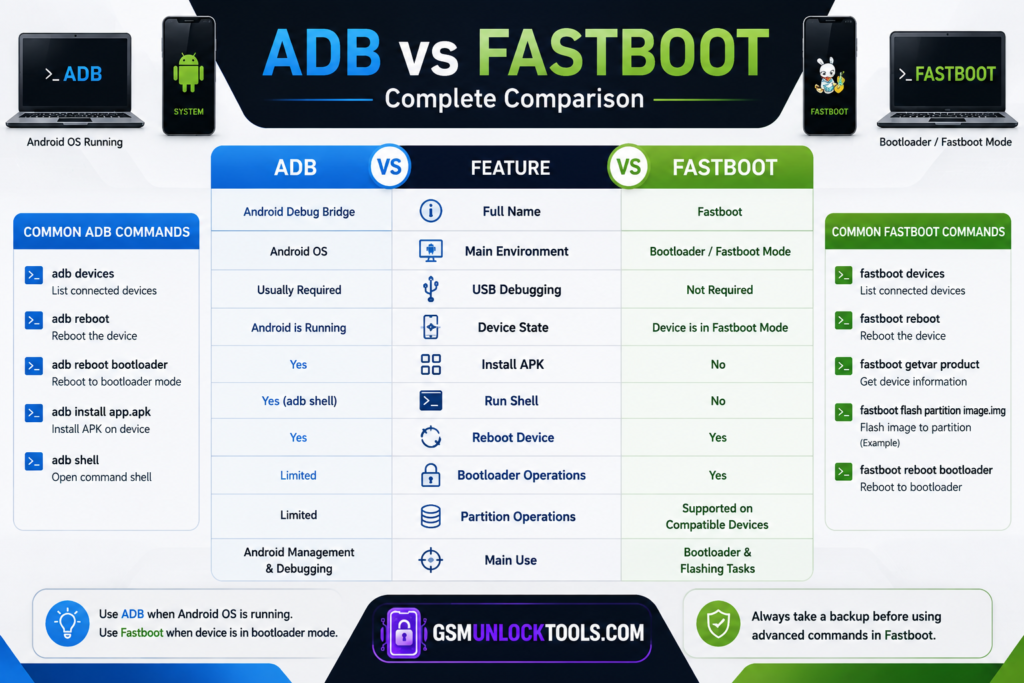
Some common ADB commands include:
- adb devices
- adb reboot
- adb reboot bootloader
- adb install app.apk
- adb shell
For example, adb devices can be used to check whether a connected Android phone is recognized by the computer. Understanding ADB vs Fastboot is important because both tools work in different device modes.
What Is Fastboot?
Fastboot is another Android communication protocol, but it works primarily when the device is in bootloader or Fastboot mode rather than inside the normal Android operating system.
Fastboot is especially useful for certain bootloader-related operations, testing, and flashing supported partitions. Technicians and developers may use it when Android cannot boot normally, but the bootloader can still communicate with the computer.
Common Fastboot commands include:
- fastboot devices
- fastboot reboot
- fastboot getvar product
Some advanced Fastboot operations can modify device partitions. Because of this, users should understand the device’s partition layout and manufacturer requirements before running flashing commands.
ADB vs Fastboot: Main Difference
The easiest way to understand the difference is to look at where Android is running.
ADB generally communicates with the Android operating system, while Fastboot communicates with the device’s bootloader.
| Feature | ADB | Fastboot |
| Full Name | Android Debug Bridge | Fastboot |
| Main Environment | Android OS | Bootloader/Fastboot Mode |
| USB Debugging | Usually required | Not required |
| Device State | Android is running | Device is in Fastboot mode |
| Install APK | Yes | No |
| Run ADB Shell | Yes | No |
| Reboot Device | Yes | Yes |
| Bootloader Operations | Limited | Yes |
| Partition Operations | Limited | Supported on compatible devices |
| Main Use | Android management and debugging | Bootloader and flashing tasks |
When Should You Use ADB?
ADB is useful when your phone is still able to boot into Android and communicate with your computer.
For example, you might use ADB to:
- Check whether a device is detected.
- Collect basic device information.
- Install an APK from a computer.
- Access an Android shell.
- Reboot the phone.
- Reboot into recovery or bootloader mode.
- Perform certain debugging and maintenance tasks.
ADB can therefore be considered a communication and management interface for a running Android system.
When Should You Use Fastboot?
Fastboot becomes more useful when you need to work with the phone’s bootloader. Typical uses can include:
- Checking Fastboot device detection.
- Rebooting from bootloader mode.
- Checking certain bootloader variables.
- Flashing compatible images on supported devices.
- Testing boot images during development.
- Performing certain bootloader-related maintenance operations.
However, not every Android phone supports the same Fastboot commands or partition operations. Manufacturers can also implement different bootloader restrictions.
Can ADB and Fastboot Be Used Together?
Understanding ADB vs Fastboot is useful when switching between Android OS and bootloader modes during repair or development workflows.
For example, if a phone is running normally, a technician may use: adb reboot bootloader
This can restart a supported device into bootloader mode.
Once the device enters Fastboot mode, ADB commands are no longer the appropriate interface. Instead, the technician can check the connection with: fastboot devices. This ADB vs Fastboot comparison shows how both tools complement each other rather than replacing one another.
ADB vs Fastboot: Which One Is Better?
There is no single tool that is better for every situation. ADB is better for communication with a running Android system, while Fastboot is better for supported bootloader-level operations.
If your phone is working normally and you need to manage or troubleshoot Android, ADB is usually the more appropriate choice. If the device is in bootloader/Fastboot mode and you need to perform a compatible bootloader operation, Fastboot is the correct interface.
Choosing the wrong command can result in an error simply because the device is in the wrong mode.
Common Connection Problems
If your PC does not detect an Android device, understanding ADB vs Fastboot can help identify whether the problem is related to USB drivers, cables, ports, permissions, or the device mode.
For ADB, make sure USB Debugging is enabled and the computer has been authorized on the phone.
For Fastboot, make sure the device is actually in Fastboot/bootloader mode and that the appropriate USB driver is installed on Windows.
You can also try another USB port or cable and check Device Manager for driver-related problems.
Conlcusion
The difference between ADB and Fastboot mainly comes down to the environment in which they communicate with an Android phone. ADB is designed for interacting with a running Android operating system, while Fastboot works with the bootloader for supported low-level operations.
For Android users and mobile technicians, knowing when to use each interface makes troubleshooting much easier. Before executing advanced commands, always verify the device model, bootloader status, supported commands, and available firmware or images. This is particularly important because incorrect flashing or partition operations can cause serious software problems.
If you regularly work with Android servicing tools, understanding ADB vs Fastboot is an important foundation for learning more advanced Android repair and troubleshooting techniques.