
HELIOS TOOL V1.0.0 Free Download Setup Latest Version [2027]
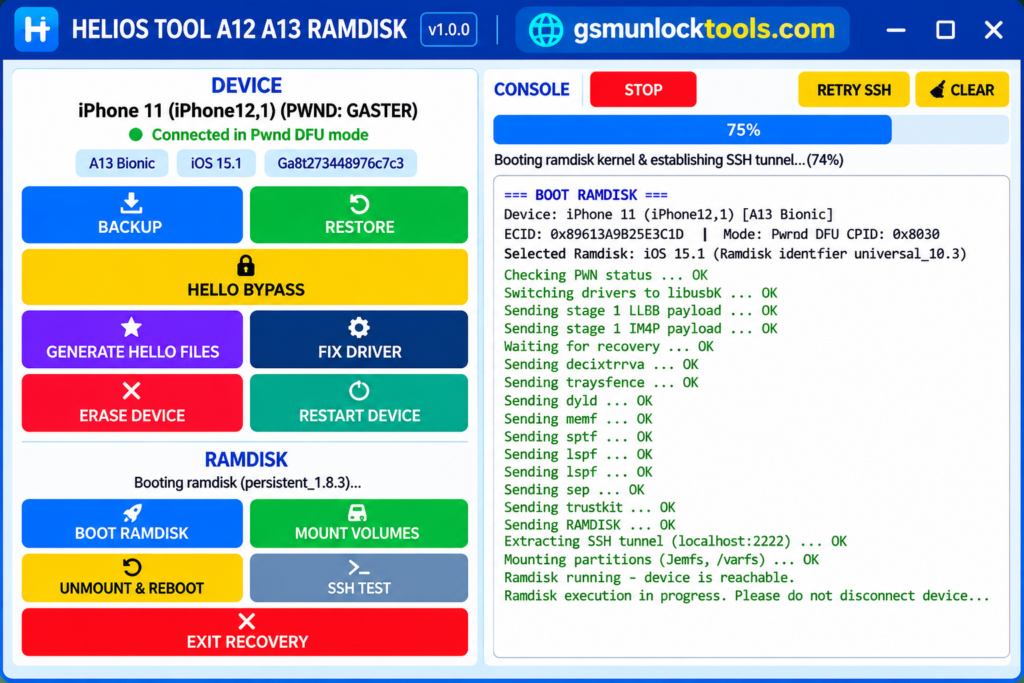
When you are struggling with passcode removal, activation issues, or advanced servicing on supported Apple A12 and A13 devices, HELIOS TOOL provides a Windows-based solution with DFU and ramdisk operations. It offers device information detection, activation-record backup and restore, volume mounting, SSH testing, and other professional servicing functions. With automatic ramdisk selection and DFU driver support, the tool streamlines compatible device maintenance from diagnosis to solution.
What is the HELIOS TOOL?
HELIOS TOOL is a Windows-based utility for servicing and managing supported Apple devices powered by A12 and A13 Bionic chipsets. It uses DFU mode and ramdisk-based operations to provide device diagnostics, activation-record backup and restore, volume mounting, SSH testing, and other technical maintenance functions for compatible devices.
Key Features of the HELIOS TOOL
A12 & A13 Device Support
HELIOS TOOL supports Apple devices powered by A12 and A13 Bionic chipsets. It provides device-specific servicing and maintenance options through a Windows-based interface.
DFU & Ramdisk Operations
The tool works with supported devices in DFU mode for advanced technical operations. It uses compatible ramdisk files to perform various servicing and maintenance tasks.
Device Information Detection
It displays important device information, including ECID, chipset, and iOS details. This helps technicians identify the connected device before starting supported operations.
Volume Mounting & SSH Testing
This tool provides volume mounting and SSH testing options for technical maintenance. These features help authorized users perform supported diagnostics and ramdisk operations.
Automatic Ramdisk Selection
The software can automatically select appropriate ramdisk resources for detected devices. Selection is based on device compatibility and the installed iOS version.
What’s New in the HELIOS TOOL?
- First public release of HELIOS TOOL v1.0.0.
- Added support for compatible A12 and A13 Bionic devices.
- Introduced automatic ramdisk selection.
- Added activation-record backup and restore.
- Included passcode removal functionality.
- Added Hello Bypass as a beta feature.
- Introduced Hello file generation.
- Added automatic libusbK and usbliter8 DFU driver installation.
- Included volume mounting and SSH testing.
- Added standard ramdisk boot and servicing operations.
System Requirements
| Requirements | Specifications |
| Operating System | Windows |
| Processor | Intel or AMD |
| RAM | Sufficient memory for Windows and the tool |
| Storage | Free space for software, drivers, and ramdisk files |
| Device Compatibility | Apple A12 and A13 Bionic devices |
| USB Connection | Working USB port and reliable cable |
| Required Drivers | libusbK and usbliter8 |
| Additional Software | Compatible Apple device drivers, if required |
How to Download & Install the HELIOS TOOL?
- Visit a trusted HELIOS TOOL download source.
- Download the tool v1.0.0 package.
- Extract the downloaded ZIP file using WinRAR or 7-Zip.
- Scan the extracted files with antivirus software.
- Install the required libusbK and usbliter8 DFU drivers.
- Launch the HELIOS TOOL executable on Windows.
- Connect a compatible A12 or A13 Apple device via USB.
- Follow the documented procedure to enter DFU mode.
- Check the detected ECID, chipset, and iOS version.
- Select the required supported servicing or ramdisk function.
- Follow the on-screen instructions and verify the results.
Pros & Cons
| Pros | Cons |
| Free Windows-based utility. | Supports only compatible A12 and A13 devices. |
| Offers multiple ramdisk operations. | Requires DFU mode for operations. |
| Automatic ramdisk selection. | Requires compatible ramdisk files. |
| Includes backup and restore options. | Hello Bypass is still in beta. |
| Supports volume mounting and SSH testing. | Requires proper USB drivers. |
| Displays ECID, chipset, and iOS details. | Some functions may depend on device and iOS compatibility. |
Also check: GEN PRO Tool V2.0.2.23 7.5 Free Download for PC Fastboot to EDL [2027]
Conclusion
HELIOS TOOL is a Windows-based Apple device servicing utility for supported A12 and A13 Bionic devices. With features such as DFU support, ramdisk operations, activation-record backup and restore, volume mounting, and SSH testing, it provides several useful maintenance options for compatible devices. Its automatic ramdisk selection and driver support make servicing workflows more convenient. However, users should verify device compatibility and remember that Hello Bypass is still a beta feature.
FAQ’s
Is it free to download?
Yes, HELIOS TOOL v1.0.0 is presented as a free utility for compatible Windows computers.
Does HELIOS TOOL require DFU mode?
Yes, it uses DFU mode for supported ramdisk-based device operations.
Which drivers does HELIOS TOOL install?
The tool includes automatic installation support for libusbK and usbliter8 DFU drivers.
Is it available for macOS?
The first release is described as a Windows-based application. Native macOS support has not been confirmed.
Is HELIOS TOOL safe to use?
Safety depends on the download’s authenticity and the operations you perform. Download it only from a trusted source and scan the files before running them.




One Comment