DRT Device Reset Tools Oppo V2026 Free Download for Pattern & FRP
When Oppo Qualcomm phones are locked or reset, routine servicing can be difficult because FRP, User Lock, Pattern, PIN, Password, or factory-reset issues prevent normal access. DRT Device Reset Tools provides a simple Windows-based solution for supported Oppo Qualcomm devices, bringing essential reset and servicing functions into one straightforward interface with FRP, User Lock, Pattern, factory reset, and EDL Mode support for compatible models.
What are the DRT Device Reset Tools?
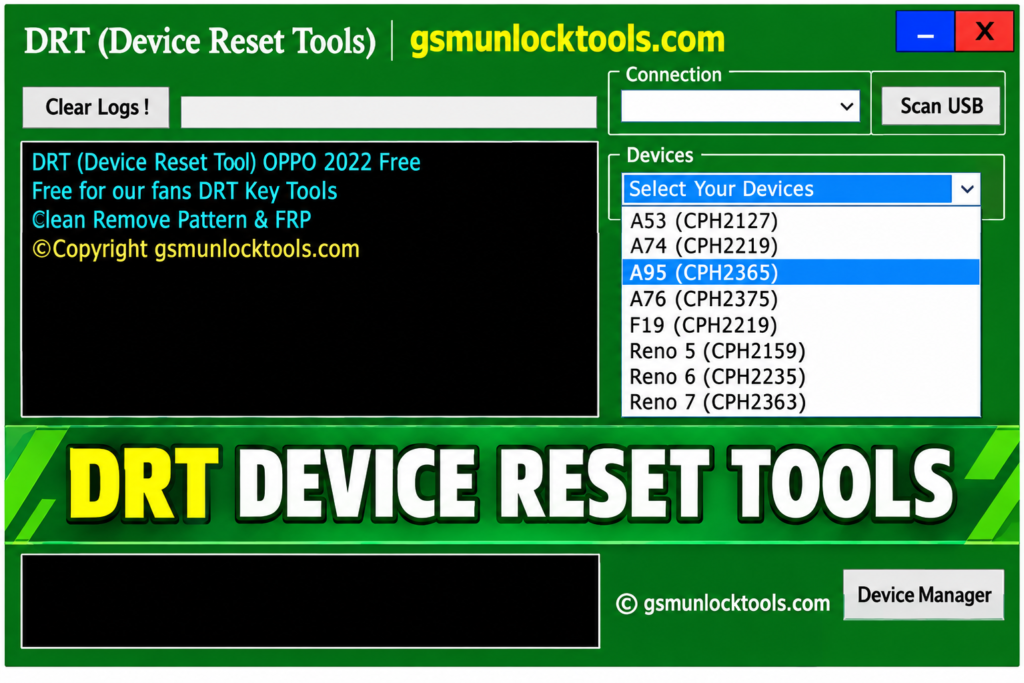
DRT Device Reset Tools are Windows-based servicing tools. They support supported Oppo Qualcomm smartphones and provide functions such as factory reset, FRP servicing, User Lock, Pattern, PIN, Password, and EDL Mode through a simple interface.
Key Features of the DRT Device Reset Tools
FRP Servicing
The tools help address FRP-related issues on supported Oppo Qualcomm devices. They provide a simple approach to supported FRP servicing tasks through the tool.
User Lock Support
The tools support User Lock servicing on compatible Oppo Qualcomm models. They are designed to handle supported lock-related servicing requirements.
Pattern, PIN & Password
The tools support common screen-lock servicing functions. They are useful for compatible devices affected by Pattern, PIN, or Password locks.
Factory Reset
The tools provide factory-reset functionality for supported devices. They help return compatible devices to their default factory state.
EDL Mode Support
The tools are designed to work with compatible devices through EDL Mode. It provides EDL-based servicing functionality within the Windows utility.
Simple Windows Interface
The tool offers a straightforward interface for servicing operations. Users can access supported functions from a centralized Windows tool.
What’s New in the DRT Device Reset Tools?
- Improved FRP Servicing
- Enhanced User Lock Support
- Pattern & PIN Support
- Password Servicing
- Simplified Factory Reset
- Improved EDL Mode Support
- Expanded Model Compatibility
- Better Windows Support
System Requirements
| Requirement | Details |
| OS | Windows 7–11 |
| Architecture | 32-bit / 64-bit |
| RAM | 2 GB+ |
| USB | Working USB port |
| Drivers | Qualcomm/USB drivers |
| Device | Supported Oppo Qualcomm phones |
How to Download & Install the DRT Device Reset Tools?
- Download DRT Device Reset Tools from a trusted source.
- Click on the download link.
- Wait until the download is complete.
- Extract all files to your Desktop.
- Open the extracted folder.
- Enable USB debugging when using ADB functions.
- Open the tool that is downloaded.
- Run the tool as an administrator.
- The tool will open on your PC screen.
- Enjoy using the tool.

Pros & Cons
| Pros | Cons |
| Simple Windows interface | Compatibility varies by model |
| Supports Oppo Qualcomm devices | May not support newer security versions |
| Multiple servicing functions | Requires compatible drivers |
| EDL Mode support | Features vary by tool version |
| Supports common Windows versions | Not all devices are guaranteed to work |
Also check: Modem META Tool v10.2044.0.02 Free Download Latest Version [2026]
Conclusion
DRT Device Reset Tools is a Windows-based utility for servicing supported Oppo Qualcomm devices. With features such as FRP, User Lock, Pattern, PIN, Password, Factory Reset, and EDL Mode support, it provides a straightforward option for compatible devices. However, features and compatibility can vary by model, security version, drivers, and tool release.
FAQ’s
Is DRT Device Reset Tools free?
The versions discussed in these sources are presented as free Windows tools.
Are Qualcomm drivers required?
Compatible Qualcomm or USB drivers may be required for proper device detection.
Does DRT work with every Oppo phone?
No. Compatibility depends on the specific model, chipset, security level, and tool version.
Can DRT remove Pattern or PIN locks?
Pattern and PIN servicing is advertised for supported devices and versions.
Is DRT compatible with newer Oppo security versions?
Support can vary, so newer security versions may not be compatible with every release.
Is DRT Device Reset Tools safe to download?
Download it only from a trustworthy source and scan the archive before installation, as third-party tool packages can vary in authenticity and safety.