SamFirm Tool v3.3 Download & Setup – Latest Samsung Firmware Tool 2026
Seeking the correct firmware for your Samsung Galaxy mobile phone? The SamFirm Tool is a Samsung firmware download utility for Windows that allows you to search for the appropriate firmware using the model number, CSC, and region code. It’s a simple method for downloading stock Samsung firmware for your Galaxy phone. Read this guide to learn more about Samsung firmware installation and the download process.
What Is a SamFirm Tool?
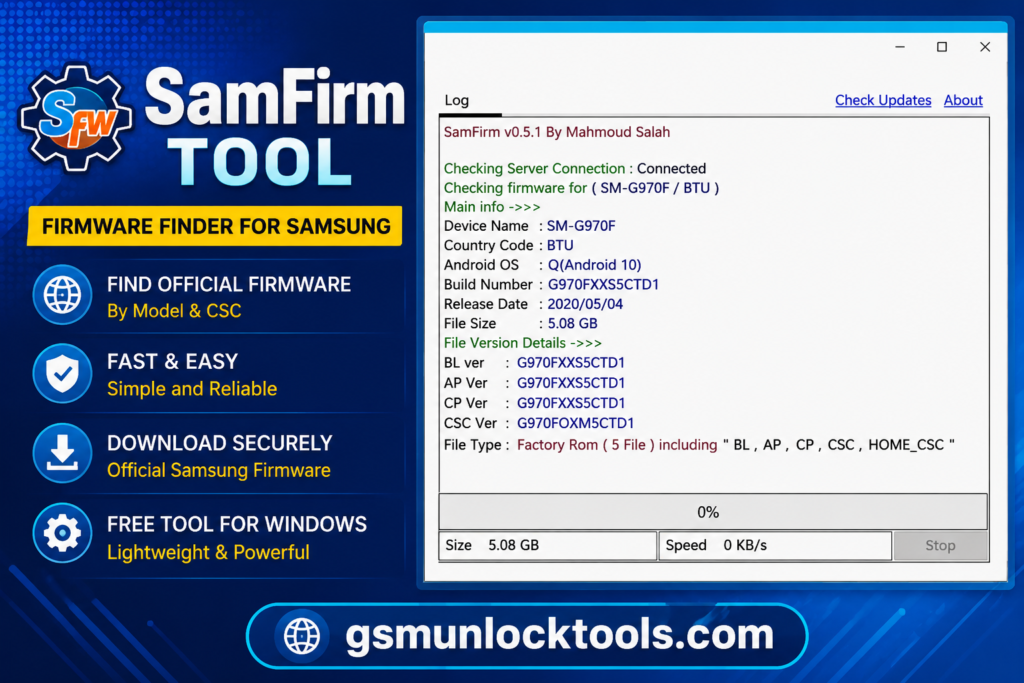
SamFirm Tool is an application for the Windows operating system that downloads stock firmware for the appropriate model number, CSC, and region code. This tool enables users to easily search for Samsung firmware for software recovery, troubleshooting, and maintenance purposes. There are many versions of SamFirm, including SamFirm and others under the SamFirm name.
What Is the SamFirm Tool Used for?
The basic functionality of the SamFirm tool is to discover and download Samsung firmware.
Depending on the version and availability of servers, the tool allows you to:
- Verify Samsung firmware availability
- Search Samsung firmware by model
- Search Samsung firmware by CSC/Region
- View firmware details
- Download firmware packages
- Decrypt downloaded firmware packages
- Prepare firmware for future installation
- Get software versions for supported Galaxy devices
The availability of firmware depends on the Samsung model, CSC, region, firmware release, and server availability.
Features of the SamFirm Tool
Samsung Firmware Downloader
The key function of the SamFirm application is that it can find and download firmware for compatible Samsung phones.
Typically, users enter their smartphone’s:
Model + Region/CSC → Check Update → Get Information about Firmware → Download
This approach allows finding the firmware much more easily than browsing through many options in firmware collections.
Model Number Finder
The Samsung model number represents the actual hardware version of the Galaxy phone.
For example, these can be model series like:
- SM-S series
- SM-A series
- SM-M series
- SM-N series
- SM-F series
- SM-G series
The correct model name should be used, as similar-looking Samsung phones may have completely different firmware.
CSC / Region Selection
CSC plays a key role in the identification of Samsung firmware.
CSC data could be related to:
- Country
- Region
- Carrier
- Network configuration
- Software customization
- Region-specific features
An incorrect CSC could lead to improper firmware choice. Therefore, users need to check the CSC on their phone before choosing the firmware.
Firmware Information
If possible, SamFirm provides the user with information regarding the availability of the firmware package to know the software version before downloading it.
The information that can be retrieved by using the tool might include:
- Model
- Region
- Firmware version
- Build info
- Size of file
- CSC
- Information on updates available
It depends on the version and available firmware information of Samsung.
Firmware Download
SamFirm helps to download firmware once it finds a suitable firmware package for the device.
The files are usually big, so users need to make sure that they have:
- Internet
- Disk space
- Power supply
- A working download connection
- Do not interrupt a firmware download unnecessarily.
How to Download the SamFirm Tool
- Mention the Exact Version: Clearly state the SamFirm Tool version.
- Identify the Source: Tell users where the setup comes from.
- Add the Download Button: Use a clear and descriptive download button.
- Avoid Generic Claims: Don’t use phrases like “100% working” or “latest version” without specific version details.
- Keep Information Accurate: Make sure the displayed version matches the actual downloadable setup.
Download information
| Information | Details |
| Tool Name | SamFirm Tool |
| Platform | Windows |
| Main Purpose | Samsung Firmware Download |
| Device Brand | Samsung Galaxy |
| Connection | Internet |
| Model Required | Yes |
| CSC/Region | Usually required |
| Firmware | Samsung firmware packages |
| License/Source | Verify for the specific build |
Also check: AFT Tool v5.1.8. Download the latest version (100% working)
Because older SamFirm releases and newer third-party “SamFirm A.I.O.” builds are different products, your download page should clearly state which one you’re providing.
How to install the SamFirm Tool
- Open the Software: Run the SamFirm executable/installer.
- Security Alert: If Windows shows a security alert message box, make sure that your file came from a reputable source.
- Get Your Device Details Ready: Have your Samsung device details ready, such as the:
- Samsung device model number
- CSC/Region
- Current software details.
SamFirm Tool vs others
SamFirm Tool vs Frija
Both SamFirm and Frija are associated with Samsung firmware downloading, but they are not identical applications.
| Feature | SamFirm | Frija |
| Samsung firmware search | Yes | Yes |
| Windows | Yes | Yes |
| Model-based lookup | Yes | Yes |
| CSC-based lookup | Yes | Yes |
| Firmware download | Yes | Yes |
| Modern replacement | Older tool | Common alternative |
| Interface | Simple | Simple |
| Development history | Older | Newer alternative |
Community discussions have described SamFirm as an older/deprecated solution and Frija as a newer alternative for Samsung firmware downloads.
SamFirm Tool vs Samsung Smart Switch
These tools serve different purposes.
SamFirm is primarily associated with firmware lookup and downloading.
Samsung Smart Switch is Samsung’s official consumer software for transferring data and, on supported devices, installing software updates through a Windows or Mac computer.
| Feature | SamFirm | Samsung Smart Switch |
| Firmware lookup/download | Main purpose | Not its primary purpose |
| Official Samsung consumer software | No | Yes |
| PC software update | Not primary | Yes |
| Data transfer | No | Yes |
| Backup/restore | No | Yes |
| Manual firmware workflow | More relevant | Limited |
SamFirm Tool Common Problems
| Problem / Topic | Main Cause | Recommended Solution |
| Firmware Not Found | Wrong model/CSC, unavailable region firmware, outdated tool, server, or network issue | Check the exact model and CSC, then try again or use another trusted Samsung firmware service |
| Download Error | Unstable internet, server issue, low disk space, wrong folder | Check the internet and storage space; retry later if the server is temporarily unavailable |
| Model Error | Incorrect or incomplete model number | Verify the full model number without adding or removing symbols |
| CSC Error | Incorrect CSC or firmware unavailable for the region/carrier | Confirm the CSC matches the device model and region |
| Tool Will Not Open | Incomplete extraction, Windows security block, missing runtime, unsupported Windows | Fully extract the tool, check security alerts, use a supported Windows version, and download from a reliable source |
| Slow Firmware Download | Large firmware file, slow server, or weak internet | Use a stable connection, close bandwidth-heavy apps, check storage, or try again later |
| Before Firmware Download | Incorrect device information or insufficient preparation | Verify model + CSC, back up data, charge the device, and use a quality USB cable |
| During Firmware Update | USB/power interruption can cause problems | Keep the device connected and avoid interruptions during the update |
| Firmware Backup | Previous firmware may be needed later | Save the original firmware version when possible |
| Key Advantages | — | Easy firmware search, model/CSC filtering, firmware information, Windows support, and less manual searching |
Limitations of the SamFirm Tool
SamFirm also comes with some limitations.
- It is an outdated tool.
- The behavior of the firmware server might vary.
- There might be certain models or CSC codes that give no result.
- It might not be reliable for more recent Samsung firmware architecture.
- It is not an alternative to Samsung’s own update application.
- Firmware downloading doesn’t mean automatic installation.
- “SamFirm A.I.O.” third-party versions are different from the original firmware downloader.
This detail becomes especially relevant in creating a download website since people who search for “SamFirm Tool” might refer to other applications.
Conclusion
amFirm Tool is a Windows-based utility focused on finding and downloading Samsung firmware using the device model number and CSC code. It can simplify firmware discovery, while alternatives such as Frija may be useful for newer Samsung firmware structures. For regular updates, Samsung’s official Software Update and Smart Switch solutions remain the preferred options.
FAQ’s
Is the SamFirm Tool free?
The first SamFirm was released as a free firmware download checker utility. Still, please be sure to confirm the license of the particular build.
Is SamFirm able to download Samsung firmware?
Yes, firmware downloading is the core function where applicable Samsung firmware is available, and there is a proper connection to the tool/server.
Is SamFirm compatible with all Samsung phones?
Not necessarily; compatibility depends on the phone model, CSC, availability of firmware, Samsung server architecture, and age of SamFirm build.
What is CSC?
CSC stands for Consumer Software Customization, which is connected with regional and carrier-specific software versions.